Eino ADK: Master AI Agent Core Design Patterns, Build Agent Systems from Scratch
Preface
As large language models break through the bottleneck of “understanding and generation”, Agents rapidly become the mainstream form of AI deployment. From intelligent customer service to automated office work, almost all scenarios require Agents to bridge LLM capabilities and execute specific tasks.
But pain points emerge with technological evolution. Some teams struggle to connect LLMs with business systems, causing Agents to only “talk empty”; some suffer from missing state management, making Agents frequently “lose memory” during task execution. Complex interaction flows further increase development difficulty.
For this reason, Eino ADK (Agent Development Kit) was created to provide Go developers with a complete, flexible, and powerful agent development framework, directly addressing core challenges in traditional development.
🙋 What is an Agent?
An Agent represents an independent, executable intelligent task unit that can learn autonomously, adapt, and make decisions. Main capabilities include:
- Reasoning: Agents can analyze data, identify patterns, use logic and available information to draw conclusions, make inferences, and solve problems.
- Action: Agents take actions or execute tasks based on decisions, plans, or external inputs to achieve goals.
- Observation: Agents autonomously collect relevant information (such as computer vision, natural language processing, or sensor data analysis) to understand context and lay the foundation for informed decision-making.
- Planning: Agents can determine necessary steps, evaluate potential actions, and select the best course of action based on available information and expected outcomes.
- Collaboration: Agents can effectively collaborate with others (whether humans or other AI agents) in complex and dynamic environments.
You can think of it as an “intelligent entity” that can understand instructions, execute tasks, and provide responses. Any scenario requiring interaction with large language models (LLMs) can be abstracted as an Agent. For example:
- An Agent for querying weather information.
- An Agent for scheduling meetings.
- An Agent capable of answering domain-specific knowledge questions.
🙋♂️ What is Eino ADK?
Eino ADK is an Agent and Multi-Agent development framework designed specifically for the Go language, with design references from Google-ADK’s definitions of Agents and collaboration mechanisms.
It’s not just a tool library, but a complete agent development system: through unified abstract interfaces, flexible composition patterns, and powerful collaboration mechanisms, it breaks down complex AI applications into independent, composable agent units, allowing developers to build complex agent systems like assembling LEGO blocks:
- Less glue code: Unified interfaces and event streams make complex task decomposition more natural.
- Fast orchestration: Preset patterns + workflows assemble pipelines in minutes.
- More controllable: Interruptible, resumable, auditable - Agent collaboration process is “visible”.
Whether you’re a newcomer to AI applications or an experienced developer, ADK can provide you with suitable tools and patterns. Its design philosophy is “simple things are simple to do, complex things are also achievable” - letting developers focus on implementing business logic without worrying about underlying technical complexity.
Core Building Blocks
🧠 ChatModelAgent: The Brain for Intelligent Decisions
ChatModelAgent is the most important pre-built component in ADK. It encapsulates the interaction logic with large language models and implements the classic ReAct (Reason-Act-Observe) pattern. The running process is:
- Call LLM (Reason)
- LLM returns tool call request (Action)
- ChatModelAgent executes tool (Act)
- Return tool results to LLM (Observation), continue generating with previous context until the model determines no Tool call is needed, then end.
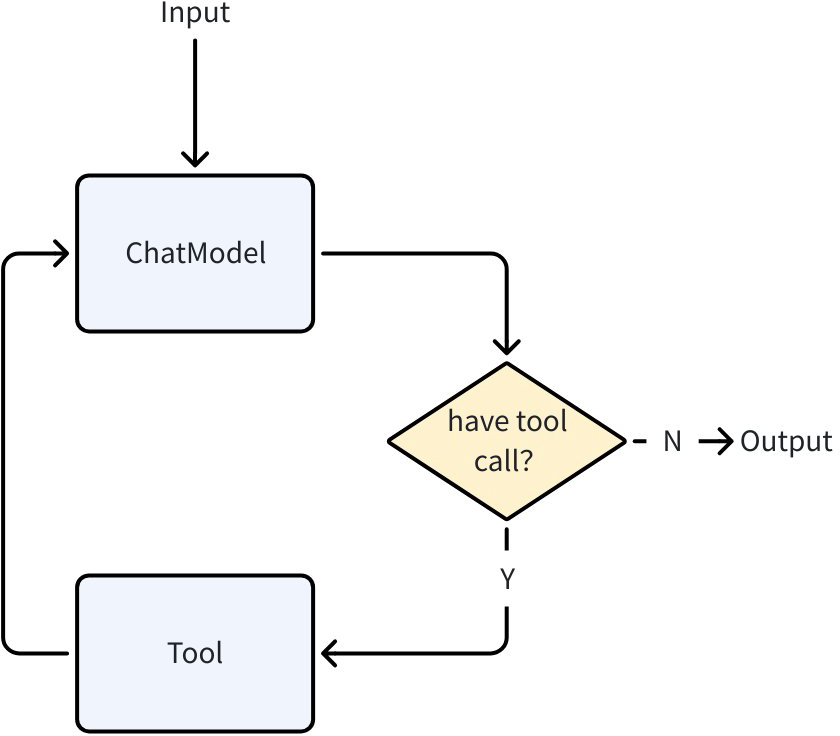
The core of the ReAct pattern is the closed loop of “Think → Act → Observe → Think again”, solving the pain points of traditional Agents’ “blind action” or “disconnect between reasoning and action”. Here are some possible practical scenarios:
- Industry Track Analysis: Using the ReAct pattern avoids information overload from collecting all information at once, focusing on core issues through step-by-step reasoning; using data to verify thinking rather than relying on intuition for decisions, the process is explainable, improving the accuracy of generated reports.
- Think-1: To judge track potential, need 4 types of information: “policy support strength, industry growth rate, leading company profitability, supply chain bottlenecks”.
- Act-1: Call API to get overall industry financial report data
- Think-2: Analyze data, determine high industry growth + policy endorsement, but rising upstream prices may squeeze mid-to-downstream profits, need further verification of impact
- Act-2: Call API to get supply/demand, industry research reports and other detailed data
- Think-3: Integrate conclusions to generate analysis report, attach key data sources
- IT Fault Operations: Using the ReAct pattern gradually narrows down the problem scope, avoiding blind operations; each step has evidence, convenient for secondary verification by operations engineers before implementing solutions, providing a basis for subsequent review and preventive measures.
- Think-1: Clarify common causes of failure, e.g., common causes of downtime are “CPU overload, insufficient memory, full disk, service crash”, need to check basic monitoring data first
- Act-1: Call “Monitoring System API” to query server metrics data
- Think-2: Determine main cause, e.g., if CPU utilization is abnormal, further investigate which processes have high CPU usage
- Act-2: Use “Process Management Tool” to check TOP processes, see if there are abnormal services
- Think-3: Found logging service abnormal, possibly “log files too large” or “configuration error”, need to further check logging service configuration and log file size
- Act-3: Execute bash commands, found log files too large, also rotation not enabled in configuration, no maximum log size set
- Think-4: Provide feasible solutions to operations engineer: clean logs, modify configuration to enable rotation, restart logging service and application
ChatModelAgent leverages the powerful capabilities of LLM for reasoning, understanding natural language, making decisions, generating responses, and tool interaction, acting as the “thinking” part of agent applications. You can quickly build a ChatModelAgent with ReAct capability using ADK:
import github.com/cloudwego/eino/adk

// Create a ReAct ChatModelAgent with multiple tools
chatAgent := adk.NewChatModelAgent(ctx, &adk.ChatModelAgentConfig{
    Name:        "intelligent_assistant",
    Description: "An intelligent assistant capable of using multiple tools to solve complex problems",
    Instruction: "You are a professional assistant who can use the provided tools to help users solve problems",
    Model:       openaiModel,
    ToolsConfig: adk.ToolsConfig{
        Tools: []tool.BaseTool{
            searchTool,
            calculatorTool,
            weatherTool,
        },
    }
})
🎭 WorkflowAgents: Precision Pipelines
Eino ADK provides WorkflowAgents patterns dedicated to coordinating sub-Agent execution flows, used to manage Agent running modes through predefined logic, producing deterministic execution processes, helping achieve predictable and controllable multi-Agent collaboration methods. You can arrange and combine the following patterns as needed, combined with ChatModelAgent to construct complete workflow pipelines that meet your needs:
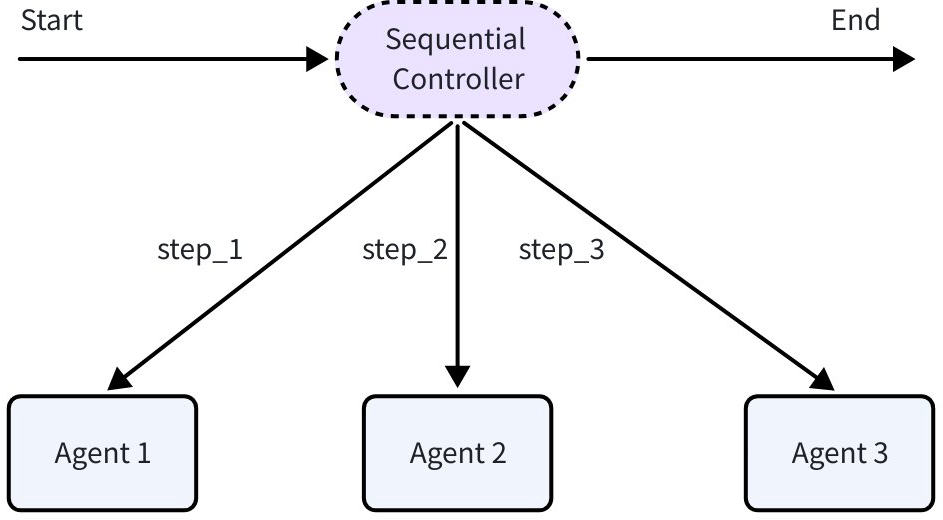
- Sequential Agent: Executes Agents registered in the configuration in order once and then ends, following these principles:
- Linear execution: Strictly follows the order of the SubAgents array.
- Output passing: Each Agent in the configuration can obtain the complete input of Sequential Agent and outputs of preceding Agents.
- Supports early exit: If any sub-Agent produces an exit/interrupt action, the entire Sequential flow terminates immediately.
- Possible practical scenarios include:
- Data ETL:
ExtractAgent(extract order data from MySQL) →TransformAgent(clean null values, format dates) →LoadAgent(load to data warehouse) - CI/CD Pipeline:
CodeCloneAgent(pull code from repository) →UnitTestAgent(run unit tests, return error and analysis report on test case failure) →CompileAgent(compile code) →DeployAgent(deploy to target environment)
- Data ETL:
import github.com/cloudwego/eino/adk

// Execute in sequence: plan research -> search materials -> write report
sequential := adk.NewSequentialAgent(ctx, &adk.SequentialAgentConfig{
    Name: "research_pipeline",
    SubAgents: []adk.Agent{
        planAgent,    // Plan research
        searchAgent,  // Search materials
        writeAgent,   // Write report
    },
})
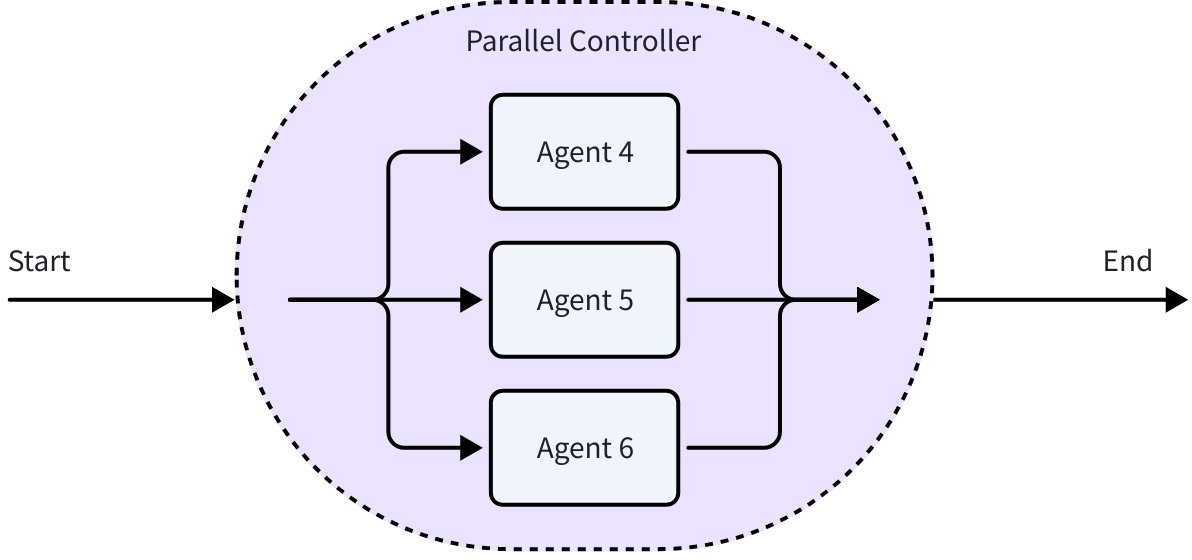
- Parallel Agent: Executes Agents registered in the configuration concurrently, ends after all Agents complete, following these principles:
- Concurrent execution: All sub-Agents start simultaneously, running in parallel in independent goroutines.
- Shared input: All sub-Agents receive the same initial input when calling Parallel Agent.
- Wait and aggregate results: Internally uses sync.WaitGroup to wait for all sub-Agents to complete, collects all sub-Agent execution results and outputs to
AsyncIteratorin order received.
- Possible practical scenarios include:
- Multi-source data collection:
MySQLCollector(collect user table) +PostgreSQLCollector(collect order table) +MongoDBCollector(collect product reviews) - Multi-channel push:
WeChatPushAgent(push to WeChat official account) +SMSPushAgent(send SMS) +AppPushAgent(push to APP)
- Multi-source data collection:
import github.com/cloudwego/eino/adk

// Concurrent execution: sentiment analysis + keyword extraction + content summary
parallel := adk.NewParallelAgent(ctx, &adk.ParallelAgentConfig{
    Name: "multi_analysis",
    SubAgents: []adk.Agent{
        sentimentAgent,  // Sentiment analysis
        keywordAgent,    // Keyword extraction
        summaryAgent,    // Content summary
    },
})
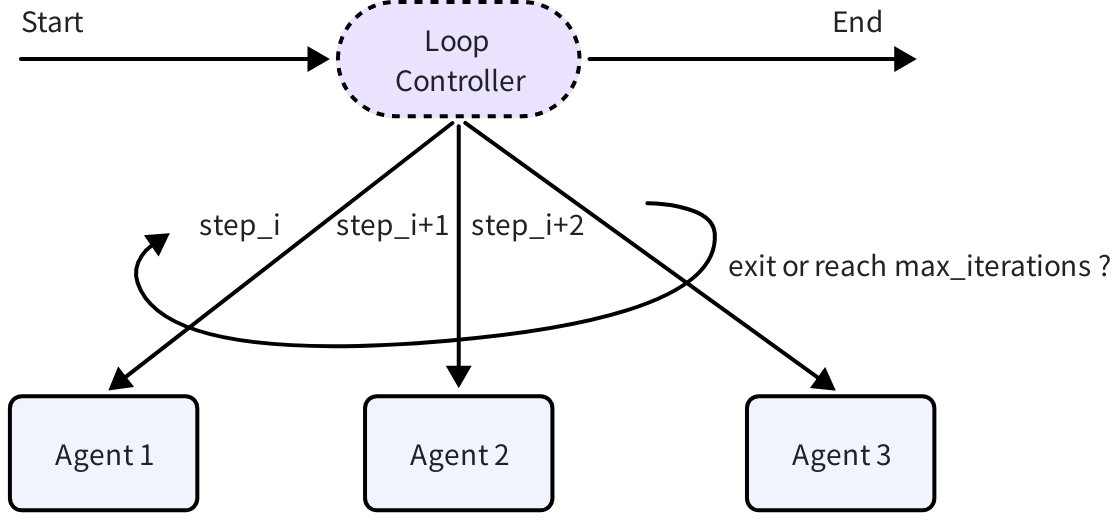
- Loop Agent: Executes Agents registered in the configuration in order and loops multiple times, following these principles:
- Loop execution: Repeatedly executes the SubAgents sequence, each loop is a complete Sequential execution process.
- Result accumulation: Results from each iteration accumulate, later iteration inputs can access all historical information.
- Conditional exit: Supports terminating the loop by outputting an event containing
ExitActionor reaching max iterations, configuringMaxIterations=0means infinite loop.
- Possible practical scenarios include:
- Data synchronization:
CheckUpdateAgent(check source database increments) →IncrementalSyncAgent(sync incremental data) →VerifySyncAgent(verify consistency) - Stress testing:
StartClientAgent(start test client) →SendRequestsAgent(send requests) →CollectMetricsAgent(collect performance metrics)
- Data synchronization:
import github.com/cloudwego/eino/adk

// Loop 5 times, each sequence: analyze current state -> propose improvement plan -> verify improvement effect
loop := adk.NewLoopAgent(ctx, &adk.LoopAgentConfig{
    Name: "iterative_optimization",
    SubAgents: []adk.Agent{
        analyzeAgent,  // Analyze current state
        improveAgent,  // Propose improvement plan
        validateAgent, // Verify improvement effect
    },
    MaxIterations: 5,
})
🛠️ Pre-built Multi-Agent Patterns
Eino ADK, based on best engineering practices accumulated from daily Multi-Agent collaboration, provides users with two pre-built Multi-Agent patterns, ready to use out of the box without designing collaboration logic from scratch, covering two core scenarios: “centralized coordination” and “structured problem solving”, efficiently supporting intelligent collaboration for complex tasks.
🎯 Supervisor Pattern: Centralized Coordination
Supervisor Agent is a centralized Multi-Agent collaboration pattern provided by ADK, designed to provide solutions for general scenarios of centralized decision-making and distributed execution. It consists of one Supervisor Agent and multiple SubAgents, where:
- Supervisor Agent is responsible for task allocation, result aggregation after sub-Agent completion, and next-step decisions.
- Sub-Agents focus on executing specific tasks and automatically return task control to the Supervisor upon completion.
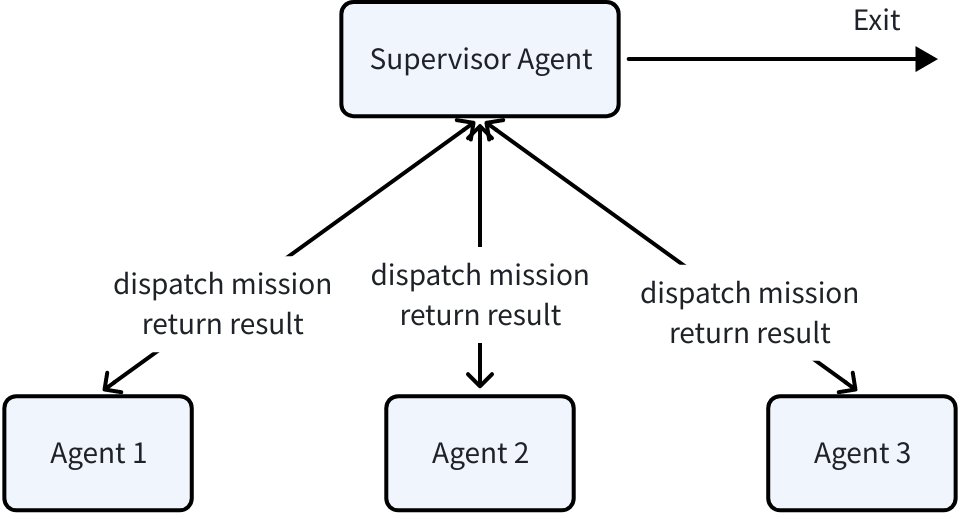
The Supervisor pattern has the following characteristics:
- Centralized control: Supervisor uniformly manages sub-Agents, can dynamically adjust task allocation based on input and sub-Agent execution results.
- Deterministic callback: Sub-Agents return running results to the Supervisor Agent after completion, avoiding collaboration flow interruption.
- Loose coupling extension: Sub-Agents can be independently developed, tested, and replaced, convenient for expansion and maintenance.
The hierarchical structure of the Supervisor pattern is well-suited for scenarios of dynamically coordinating multiple specialized Agents to complete complex tasks, such as:
- Research project management: Supervisor assigns research, experimentation, and report writing tasks to different sub-Agents.
- Customer service flow: Supervisor routes to technical support, after-sales, or sales sub-Agents based on user issue type.
import github.com/cloudwego/eino/adk/prebuilt/supervisor

// Research project management: create a supervisor pattern multi-agent
// Contains research, experimentation, report sub-Agents
supervisor, err := supervisor.New(ctx, &supervisor.Config{
    SupervisorAgent: supervisorAgent,
    SubAgents: []adk.Agent{
        researchAgent,
        experimentationAgent,
        reportAgent,
    },
})
🎯 Plan-Execute Pattern: Structured Problem Solving
Plan-Execute Agent is an ADK-provided Multi-Agent collaboration pattern based on the “plan-execute-reflect” paradigm (referencing the paper Plan-and-Solve Prompting), designed to solve problems of step-by-step decomposition, execution, and dynamic adjustment for complex tasks. Through collaborative work of three core agents - Planner, Executor, and Replanner - it achieves structured planning, tool call execution, progress evaluation, and dynamic replanning, ultimately achieving user goals, where:
- Planner: Based on user goals, generates an initial task plan with detailed, structured steps
- Executor: Executes the first step in the current plan
- Replanner: Evaluates execution progress, decides whether to correct the plan and continue with Executor, or end the task
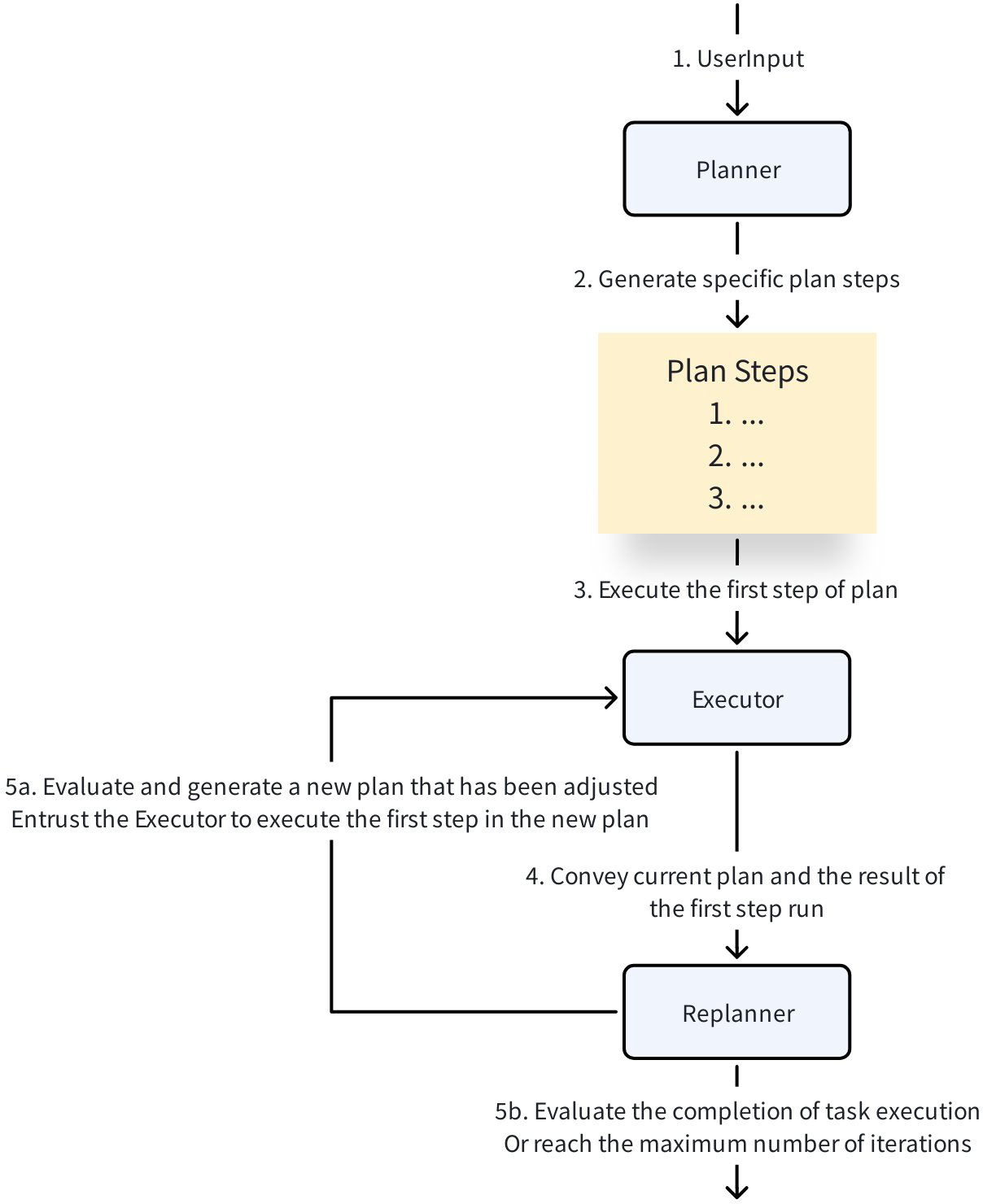
The Plan-Execute pattern has the following characteristics:
- Clear layered architecture: By decomposing tasks into planning, execution, and reflection/replanning phases, forming a clearly layered cognitive process, reflecting the closed-loop cognitive strategy of “think first, then act, then adjust based on feedback”, achieving good results in various scenarios.
- Dynamic iterative optimization: Replanner judges in real-time whether the task is complete or needs plan adjustment based on execution results and current progress, supporting dynamic replanning. This mechanism effectively solves the bottleneck of traditional single planning being unable to cope with environmental changes and task uncertainty, improving system robustness and flexibility.
- Clear responsibilities and loose coupling: The Plan-Execute pattern works through collaboration of multiple agents, supporting independent development, testing, and replacement. Modular design facilitates extension and maintenance, following engineering best practices.
- Good extensibility: Not dependent on specific language models, tools, or Agents, convenient for integrating diverse external resources, meeting different application scenario requirements.
The “Plan → Execute → Replan” closed-loop structure of the Plan-Execute pattern is well-suited for complex task scenarios requiring multi-step reasoning, dynamic adjustment, and tool integration, such as:
- Complex research analysis: Decompose research problems through planning, execute multiple rounds of data retrieval and calculation, dynamically adjust research direction and hypotheses, improving analysis depth and accuracy.
- Automated workflow management: Decompose complex business processes into structured steps, combine multiple tools (such as database queries, API calls, computation engines) for step-by-step execution, and dynamically optimize processes based on execution results.
- Multi-step problem solving: Suitable for scenarios requiring step-by-step reasoning and multi-tool collaboration, such as legal consulting, technical diagnosis, strategy formulation, ensuring feedback and adjustment at each execution step.
- Intelligent assistant task execution: Support intelligent assistants to plan task steps based on user goals, call external tools to complete specific operations, and adjust subsequent plans based on replanning thinking combined with user feedback, improving task completion integrity and accuracy.
import github.com/cloudwego/eino/adk/prebuilt/planexecute

// Plan-Execute pattern research assistant
researchAssistant := planexecute.New(ctx, &planexecute.Config{
    Planner: adk.NewChatModelAgent(ctx, &adk.ChatModelAgentConfig{
        Name: "research_planner",
        Instruction: "Formulate detailed research plan, including literature research, data collection, analysis methods, etc.",
        Model: gpt4Model,
    }),
    Executor: adk.NewChatModelAgent(ctx, &adk.ChatModelAgentConfig{
        Name: "research_executor",
        ToolsConfig: adk.ToolsConfig{
            Tools: []tool.BaseTool{
                scholarSearchTool,
                dataAnalysisTool,
                citationTool,
            },
        },
    }),
    Replanner: replannerAgent,
})
🎯 DeepAgents Pattern: Planning-Driven Centralized Collaboration
DeepAgents is a Multi-Agent pattern under unified coordination of a Main Agent. The Main Agent runs in a ReAct flow with tool-calling capable ChatModel:
- Break down user goals into structured todos and track progress through WriteTodos
- Select and call corresponding SubAgents to execute subtasks through unified entry TaskTool; main/sub agent contexts are isolated to avoid intermediate steps polluting the main flow.
- Aggregate results returned by sub-agents; call WriteTodos again if necessary to update progress or replan until completion.
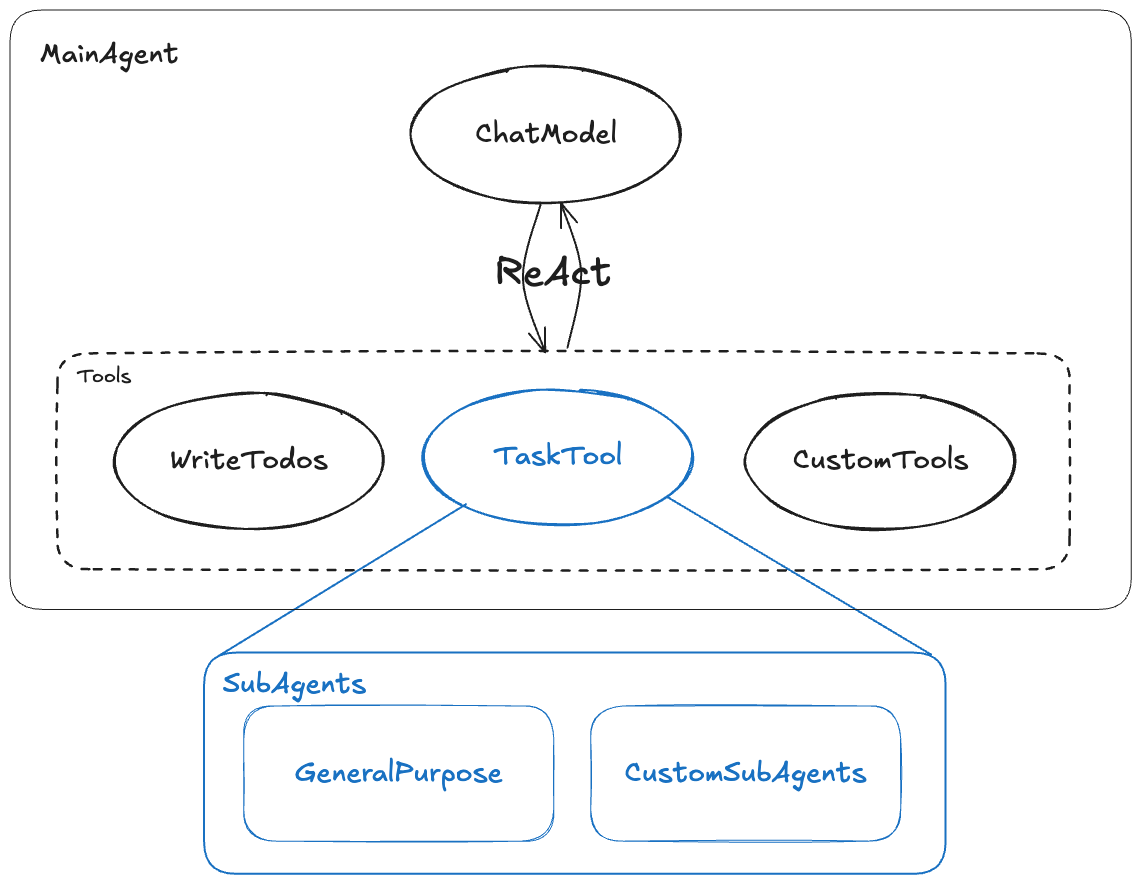
The DeepAgents pattern has the following characteristics:
- Strengthened task decomposition and progress management: Form clear subtasks and milestones through WriteTodos, making complex goals decomposable and trackable.
- More robust context isolation: Sub-agents execute in “clean” context, main agent only aggregates results, reducing interference from redundant thought chains and tool call traces on the main flow.
- Unified delegation entry, easy to extend: TaskTool abstracts all sub-agent and tool capabilities into a unified calling surface, convenient for adding or replacing specialized sub-agents.
- Flexible closed-loop between planning and execution: Planning can be called as a tool on demand; unnecessary planning can be skipped for simple tasks, reducing LLM call costs and time.
- Boundaries and tradeoffs: Over-decomposition increases call counts and costs; higher requirements for subtask division and prompt optimization, model needs stable tool-calling and planning capabilities.
The core value of DeepAgent lies in automating workflows requiring multi-step, multi-role collaboration. It’s not just a single-function executor, but a “project manager” with deep thinking, planning, and dynamic adjustment capabilities, suitable scenarios include:
- Multi-role collaboration complex business flows: Centered on R&D, testing, release, legal, operations multi-role collaboration, centrally delegate subtasks and uniformly aggregate; set checkpoints and rollback strategies at each stage, progress is visible and retryable.
- Staged management of long processes: Planning decomposes cleaning, validation, lineage analysis, quality inspection steps, sub-agents run in isolated contexts; only rerun relevant stages on exceptions, products are uniformly reconciled and aggregated.
- Execution environments requiring strict context isolation: Unified entry collects materials and requests, TaskTool routes legal, risk control, finance subtasks separately; clear boundaries between subtasks that are invisible to each other, progress and traces are auditable, failures can be retried without affecting other stages.
import github.com/cloudwego/eino/adk/prebuilt/deep

agent, err := deep.New(ctx, &deep.Config{
    Name:      "deep-agent",
    ChatModel: gpt4Model,
    SubAgents: []adk.Agent{
       LegalAgent,
       RiskControlAgent,
       FinanceAgent,
    },
    MaxIteration: 100,
})
Foundation Design
🎯 Unified Agent Abstraction
The core of ADK is a simple yet powerful Agent interface:
type Agent interface {
    Name(ctx context.Context) string
    Description(ctx context.Context) string
    Run(ctx context.Context, input *AgentInput, options ...AgentRunOption) *AsyncIterator[*AgentEvent]
}
Each Agent has a clear identity (Name), clear responsibilities (Description), and standardized execution method (Run), providing the foundation for discovery and invocation between Agents. Whether it’s a simple Q&A bot or a complex multi-step task processing system, it can be implemented through this unified interface.
⚡ Asynchronous Event-Driven Architecture
ADK adopts an asynchronous event stream design, implementing non-blocking event processing through AsyncIterator[*AgentEvent], and running Agents through the Runner framework:
- Real-time response:
AgentEventcontains specific node outputs during Agent execution (Agent replies, tool processing results, etc.), users can immediately see the Agent’s thinking process and intermediate results. - Execution tracking:
AgentEventadditionally carries state modification actions and running trajectory, convenient for development debugging and understanding Agent behavior. - Automatic flow control: The framework automatically handles interrupt, jump, and exit behaviors through
Runner, requiring no additional user intervention.
🤝 Flexible Collaboration Mechanisms
Eino ADK supports Agents within the same system to collaborate in multiple ways (exchange data or trigger runs):
- Shared Session: KV storage that persists during a single run, used to support cross-Agent state management and data sharing.
// Get all SessionValues
func GetSessionValues(ctx context.Context) map[string]any

// Get a value from SessionValues by key, second return value is false if key doesn't exist, otherwise true
func GetSessionValue(ctx context.Context, key string) (any, bool)

// Add SessionValues
func AddSessionValue(ctx context.Context, key string, value any)

// Batch add SessionValues
func AddSessionValues(ctx context.Context, kvs map[string]any)
- Transfer: Hand off task to sub-Agent for continued processing, carrying this Agent’s output result context. Suitable for scenarios where agent functions can clearly divide boundaries and hierarchies, commonly combined with ChatModelAgent, using LLM generation results for dynamic routing. Structurally, two Agents collaborating in this way are called parent and child Agents:
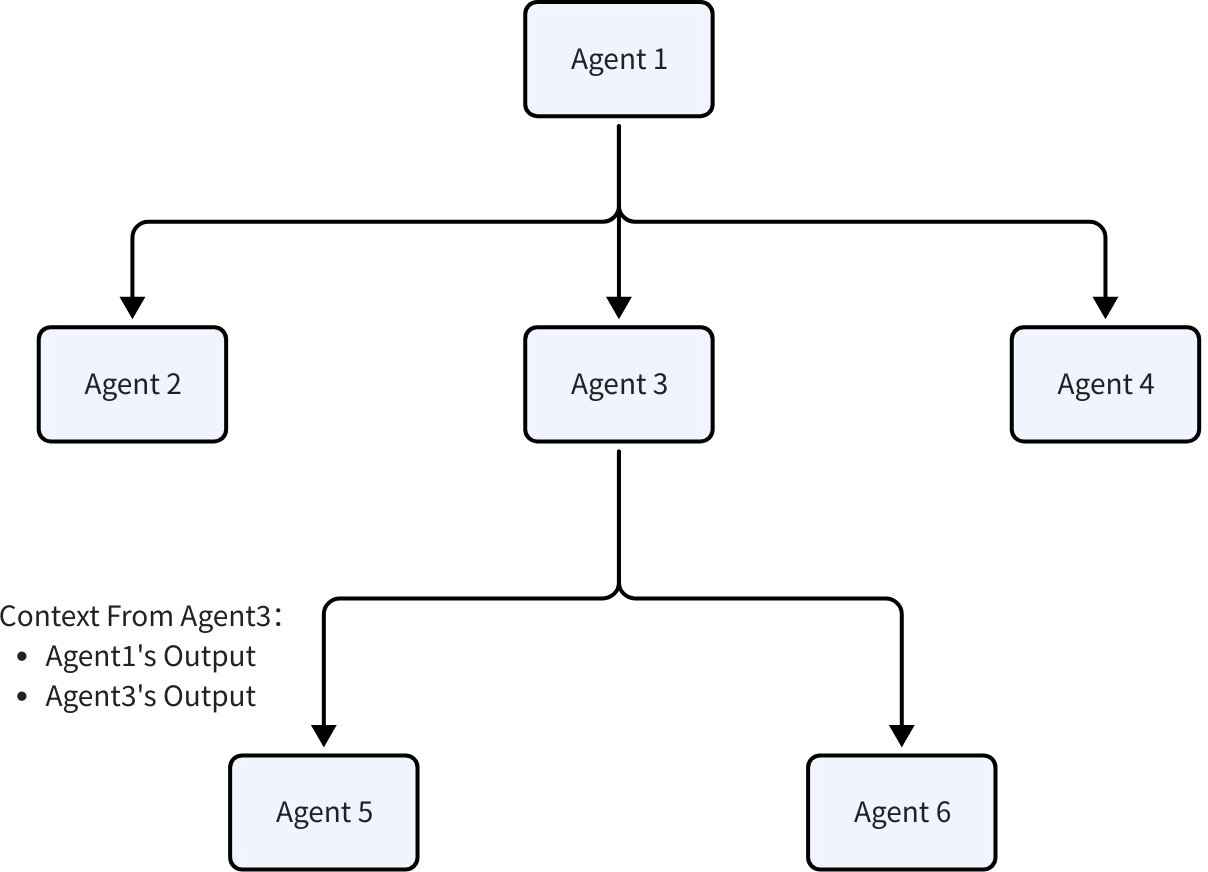
// Set parent-child Agent relationship
func SetSubAgents(ctx context.Context, agent Agent, subAgents []Agent) (Agent, error)

// Specify target Agent name, construct Transfer Event
func NewTransferToAgentAction(destAgentName string) *AgentAction
- Explicit invocation (ToolCall): Call Agent as a tool. Suitable for scenarios where Agent running only needs clear parameters rather than complete running context, commonly combined with ChatModelAgent, running as a tool and returning results to ChatModel for continued processing. Additionally, ToolCall also supports calling ordinary tools constructed according to tool interface that don’t contain Agents.
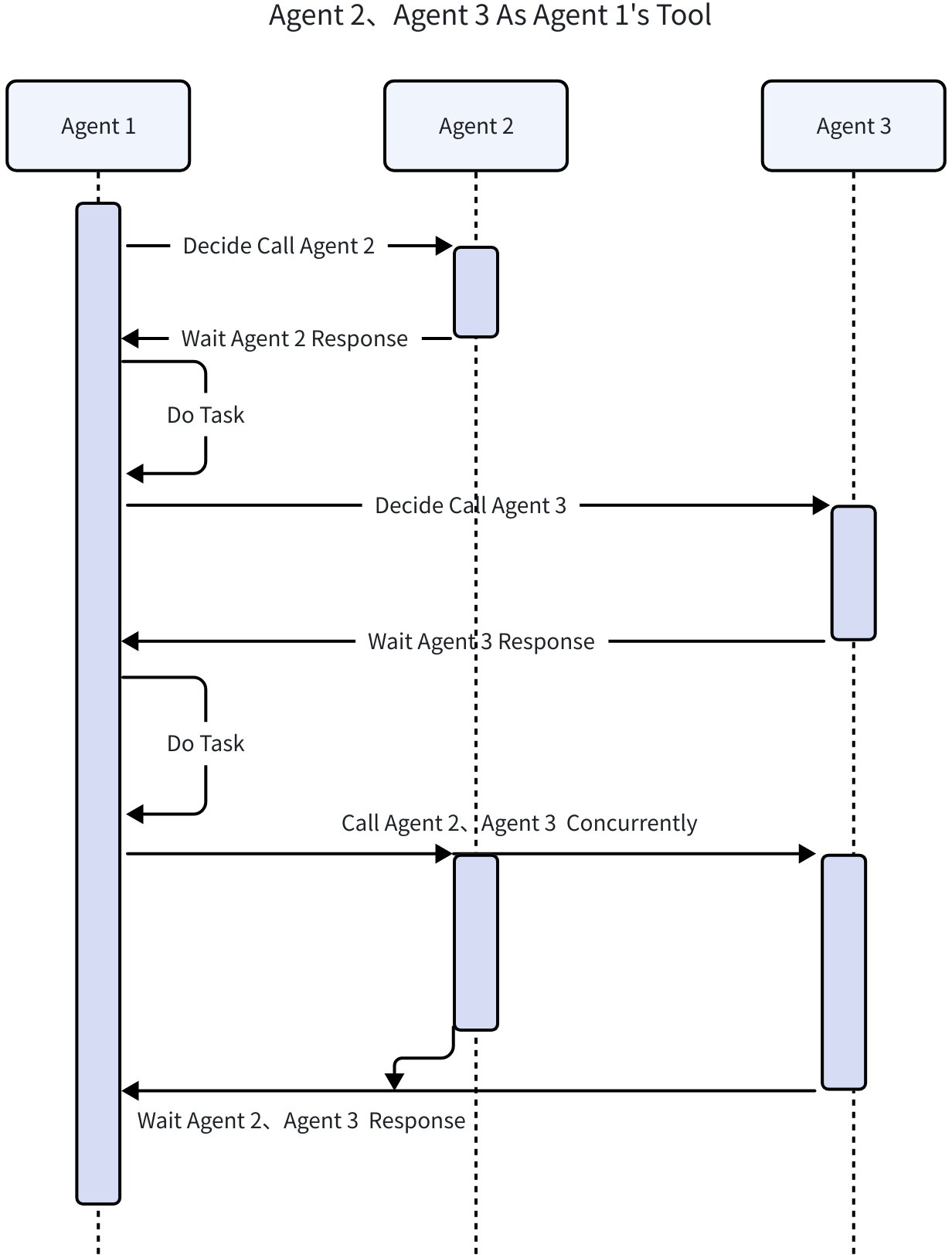
// Convert Agent to Tool
func NewAgentTool(_ context.Context, agent Agent, options ...AgentToolOption) tool.BaseTool
🔄 Interrupt and Resume Mechanism
Eino ADK provides runtime interrupt and resume functionality, allowing a running Agent to actively interrupt and save its current state, and resume execution from the interruption point in the future. This feature assists development in scenarios of long waiting, pausable, or requiring external input (Human in the loop).
- During Agent internal running, proactively notify
Runnerto interrupt running by throwingEventcontainingInterrupt Action, and allow carrying additional information for caller to read and use. Runnerrecords current running state throughCheckPointStoreregistered at initialization- When ready to run again, restart the Agent running from the breakpoint through the
Resumemethod carrying new information needed for resume
// 1. Create Runner supporting breakpoint resume
runner := adk.NewRunner(ctx, adk.RunnerConfig{
    Agent:           complexAgent,
    CheckPointStore: memoryStore, // Memory state storage
})

// 2. Start execution
iter := runner.Query(ctx, "recommend a book to me", adk.WithCheckPointID("1"))
for {
    event, ok := iter.Next()
    if !ok {
       break
    }
    if event.Err != nil {
       log.Fatal(event.Err)
    }
    if event.Action != nil {
        // 3. Interrupt event thrown internally by Agent
        if event.Action.Interrupted != nil {
           ii, _ := json.MarshalIndent(event.Action.Interrupted.Data, "", "\t")
           fmt.Printf("action: interrupted\n")
           fmt.Printf("interrupt snapshot: %v", string(ii))
        }
    }
}

// 4. Receive user input from stdin
scanner := bufio.NewScanner(os.Stdin)
fmt.Print("\nyour input here: ")
scanner.Scan()
fmt.Println()
nInput := scanner.Text()

// 5. Resume execution from breakpoint carrying user input information
iter, err := runner.Resume(ctx, "1", adk.WithToolOptions([]tool.Option{subagents.WithNewInput(nInput)}))
Quick Start
Installation
go get github.com/cloudwego/eino@latest
Project Development Manager Agent
The following example uses Eino ADK to build a project development manager agent, targeting multi-faceted management collaboration scenarios:
- Project Manager Agent: Project manager agent, using Supervisor pattern overall, with the following Agent functions:
ResearchAgent: Research Agent, responsible for research and generating feasible solutions, supports receiving additional context information from users after interruption to improve research solution generation accuracy.CodeAgent: Coding Agent, uses knowledge base tools to recall relevant knowledge as reference, generating high-quality code.ReviewAgent: Review Agent, uses sequential workflow orchestration of problem analysis, evaluation generation, and evaluation validation steps to review research results/coding results, giving reasonable evaluations for project manager decision-making.ProjectManagerAgent: Project manager Agent, routes and coordinates multiple sub-agents responsible for different dimensions of work based on dynamic user input.
- Possible work scenarios for this Agent:
- Implementing a project from scratch: Project manager starts from requirements, works through research, coding, and review Agents, finally completing project delivery.
- Improving existing projects: Project manager gets points needing improvement from review Agent, hands to coding Agent for implementation, then hands to review Agent for reviewing modified code.
- Conducting technical research: Project manager requests research Agent to generate technical research report, then review Agent gives review opinions. Caller decides subsequent actions combining returned technical research report and review opinions.
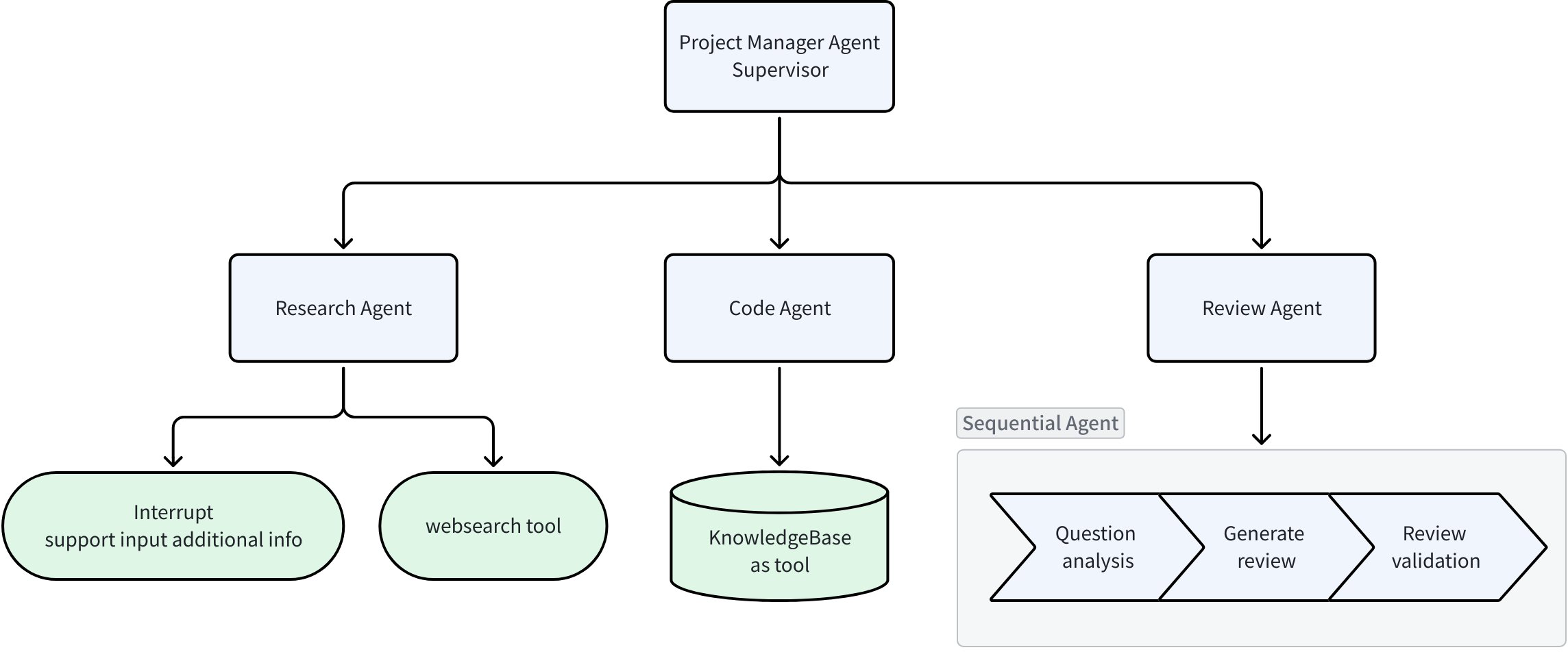
The design of this example covers most concepts introduced in the article, you can review the various design concepts mentioned earlier based on the example. Additionally, consider how to complete writing this example in ordinary development mode, ADK’s advantages become immediately apparent:
| Design Point | Traditional Development Mode | Development Based on Eino ADK |
| Agent abstraction | No unified definition, poor team collaboration efficiency, high later maintenance cost | Unified definition, independent responsibilities, clean code, convenient for separate Agent development |
| Input/Output | No unified definition, chaotic I/O, running process can only be manually logged, not conducive to debugging | Unified definition, all event-driven, running process exposed through iterator, what you see is what you get |
| Agent collaboration | Manually pass context through code | Framework automatically passes context |
| Interrupt/Resume capability | Need to implement from scratch, solving serialization/deserialization, state storage/recovery issues | Only need to register CheckPointStore in Runner to provide breakpoint data storage medium |
| Agent patterns | Need to implement from scratch | Multiple mature patterns available out of the box |
Core code as follows, complete code see source code provided in Eino-Examples project:
func main() {
    ctx := context.Background()

    // Init chat model for agents
    tcm, err := openai.NewChatModel(ctx, &openai.ChatModelConfig{
       APIKey:  os.Getenv("OPENAI_API_KEY"),
       Model:   os.Getenv("OPENAI_MODEL"),
       BaseURL: os.Getenv("OPENAI_BASE_URL"),
       ByAzure: func() bool {
          return os.Getenv("OPENAI_BY_AZURE") == "true"
       }(),
    })
    if err != nil {
       log.Fatal(err)
    }

    // Init research agent
    researchAgent, err := agents.NewResearchAgent(ctx, tcm)
    if err != nil {
       log.Fatal(err)
    }

    // Init code agent
    codeAgent, err := agents.NewCodeAgent(ctx, tcm)
    if err != nil {
       log.Fatal(err)
    }

    // Init technical agent
    reviewAgent, err := agents.NewReviewAgent(ctx, tcm)
    if err != nil {
       log.Fatal(err)
    }

    // Init project manager agent
    s, err := agents.NewProjectManagerAgent(ctx, tcm)
    if err != nil {
       log.Fatal(err)
    }

    // Combine agents into ADK supervisor pattern
    // Supervisor: project manager
    // Sub-agents: researcher / coder / reviewer
    supervisorAgent, err := supervisor.New(ctx, &supervisor.Config{
       Supervisor: s,
       SubAgents:  []adk.Agent{researchAgent, codeAgent, reviewAgent},
    })
    if err != nil {
       log.Fatal(err)
    }

    // Init Agent runner
    runner := adk.NewRunner(ctx, adk.RunnerConfig{
       Agent:           supervisorAgent,
       EnableStreaming: true,                // enable stream output
       CheckPointStore: newInMemoryStore(),  // enable checkpoint for interrupt & resume
    })

    // Replace it with your own query
    query := "please generate a simple ai chat project with python."
    checkpointID := "1"

    // Start runner with a new checkpoint id
    iter := runner.Query(ctx, query, adk.WithCheckPointID(checkpointID))
    interrupted := false
    for {
       event, ok := iter.Next()
       if !ok {
          break
       }
       if event.Err != nil {
          log.Fatal(event.Err)
       }
       if event.Action != nil && event.Action.Interrupted != nil {
          interrupted = true
       }
       prints.Event(event)
    }

    if !interrupted {
       return
    }

    // interrupt and ask for additional user context
    scanner := bufio.NewScanner(os.Stdin)
    fmt.Print("\ninput additional context for web search: ")
    scanner.Scan()
    fmt.Println()
    nInput := scanner.Text()

    // Resume by checkpoint id, with additional user context injection
    iter, err = runner.Resume(ctx, checkpointID, adk.WithToolOptions([]tool.Option{agents.WithNewInput(nInput)}))
    if err != nil {
       log.Fatal(err)
    }
    for {
       event, ok := iter.Next()
       if !ok {
          break
       }
       if event.Err != nil {
          log.Fatal(event.Err)
       }
       prints.Event(event)
    }
}
Conclusion
Eino ADK is not just a development framework, but a complete agent development ecosystem. Through unified abstractions, flexible composition, and powerful collaboration mechanisms, it enables Go developers to easily build various AI applications from simple chatbots to complex multi-agent systems.
💡 Start your agent development journey now
- 📚 View more documentation: Eino ADK Documentation
- 🛠️ Browse ADK source code: Eino ADK Source
- 💡 Explore all examples: Eino ADK Examples
- 🤝 Join the developer community: Exchange experiences and best practices with other developers
Eino ADK makes agent development simple yet powerful!