Eino: Overview
Introduction
Eino[‘aino] (pronunciation similar to: i know, hoping the framework can achieve the vision of “i know”) aims to provide the ultimate LLM application development framework based on the Go language. It draws inspiration from many excellent LLM application development frameworks in the open-source community, such as LangChain and LlamaIndex, while also incorporating cutting-edge research results and practical applications, providing an LLM application development framework that emphasizes simplicity, extensibility, reliability, and effectiveness, and is more in line with Go programming conventions.
Eino provides the following value:
- A carefully curated set of component abstractions and implementations that can be easily reused and combined for building LLM applications.
- Agent Development Kit (ADK), providing high-level abstractions for building AI agents, supporting multi-agent orchestration, human-in-the-loop interrupt mechanisms, and pre-built agent patterns.
- A powerful orchestration framework that handles the heavy lifting of type checking, stream processing, concurrency management, aspect injection, option assignment, and more.
- A carefully designed API with a focus on simplicity and clarity.
- An ever-expanding collection of best practices in the form of integrated flows and examples.
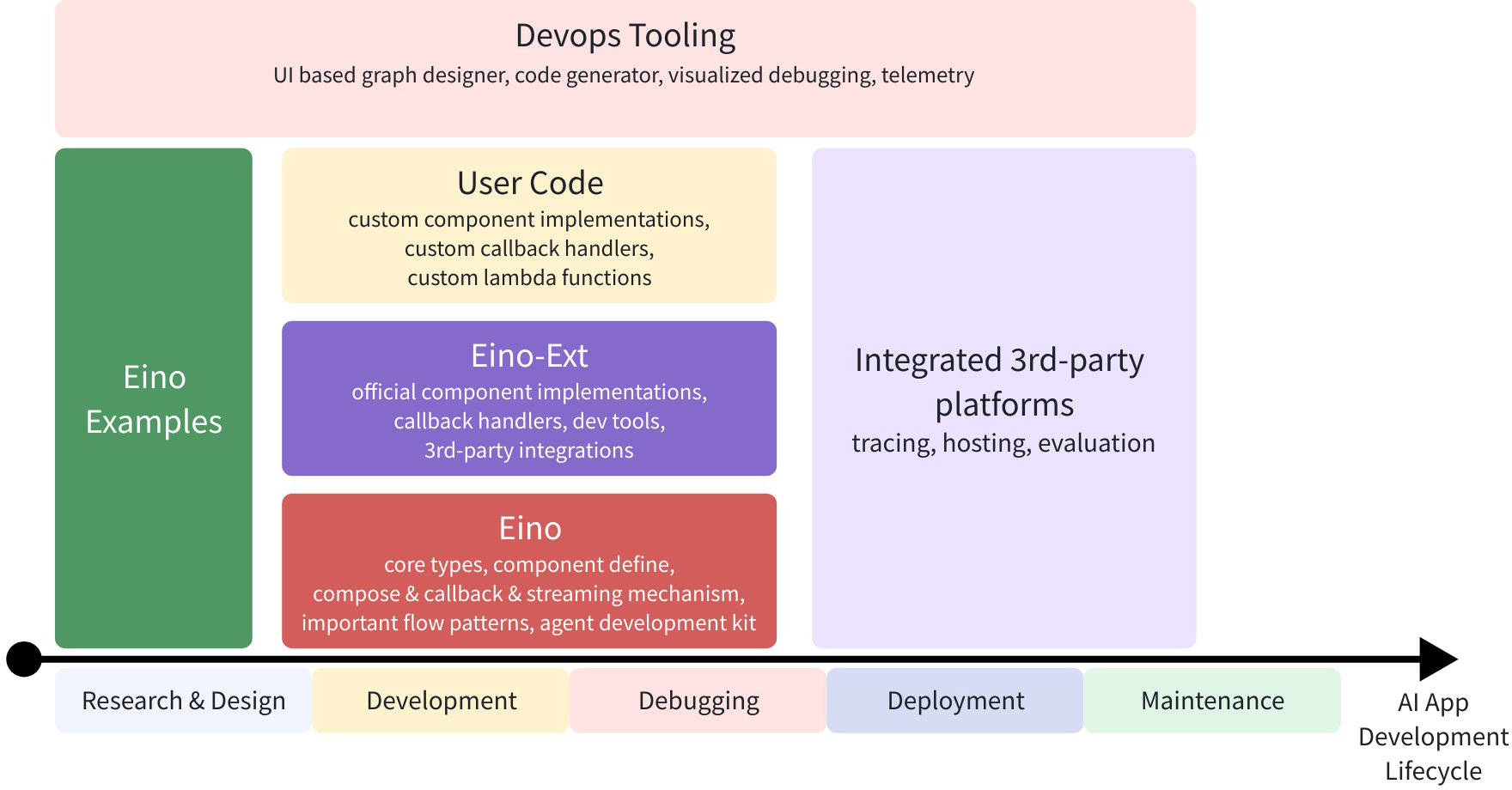
- A set of practical DevOps tools covering the entire development lifecycle from visual development and debugging to online tracing and evaluation.
With these capabilities and tools, Eino can standardize, simplify operations, and improve efficiency at different stages of the AI application development lifecycle:
Quick Start
Direct component usage:
model, _ := openai.NewChatModel(ctx, config) // create an invokable LLM instance
message, _ := model.Generate(ctx, []*Message{
    SystemMessage("you are a helpful assistant."),
    UserMessage("what does the future AI App look like?")})
Of course, you can use it like this - Eino provides many useful out-of-the-box components. But by using orchestration, you can achieve more, for three reasons:
- Orchestration encapsulates common patterns of LLM applications.
- Orchestration solves the challenge of handling LLM streaming responses.
- Orchestration handles type safety, concurrency management, aspect injection, and option assignment for you.
Eino provides three sets of APIs for orchestration:
| API | Features and Use Cases |
| Chain | Simple chain-style directed graph, can only move forward. |
| Graph | Directed cyclic or acyclic graph. Powerful and flexible. |
| Workflow | Directed acyclic graph with data mapping at the struct field level. |
Let’s create a simple chain: a ChatTemplate followed by a ChatModel.

chain, _ := NewChain[map[string]any, *Message]().
           AppendChatTemplate(prompt).
           AppendChatModel(model).
           Compile(ctx)
chain.Invoke(ctx, map[string]any{"query": "what's your name?"})
Now, let’s create a Graph, a ChatModel that either outputs the result directly or calls a Tool at most once.
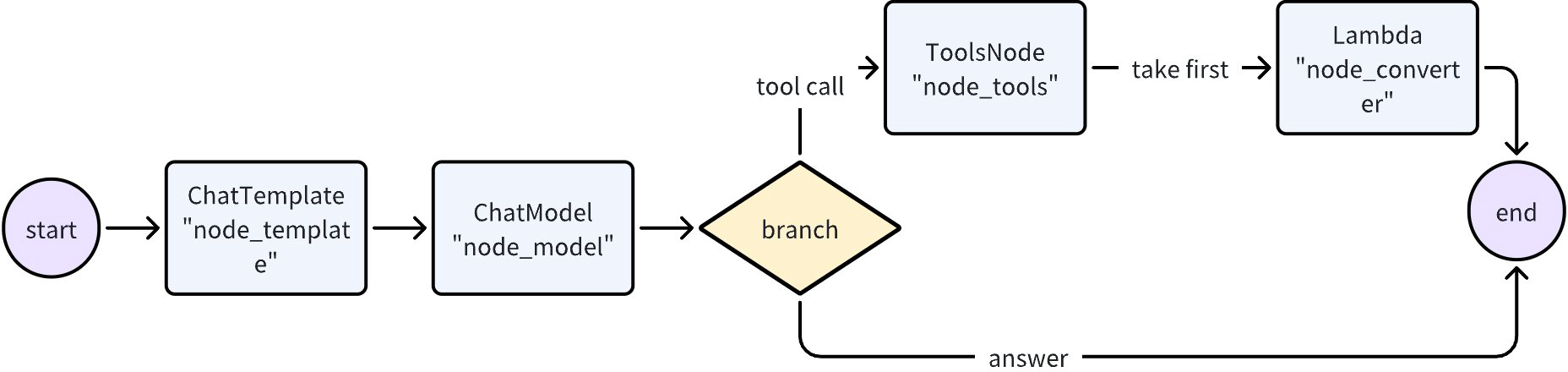
graph := NewGraph[map[string]any, *schema.Message]()

_ = graph.AddChatTemplateNode("node_template", chatTpl)
_ = graph.AddChatModelNode("node_model", chatModel)
_ = graph.AddToolsNode("node_tools", toolsNode)
_ = graph.AddLambdaNode("node_converter", takeOne)

_ = graph.AddEdge(START, "node_template")
_ = graph.AddEdge("node_template", "node_model")
_ = graph.AddBranch("node_model", branch)
_ = graph.AddEdge("node_tools", "node_converter")
_ = graph.AddEdge("node_converter", END)

compiledGraph, err := graph.Compile(ctx)
if err != nil {
return err
}
out, err := compiledGraph.Invoke(ctx, map[string]any{"query":"Beijing's weather this weekend"})
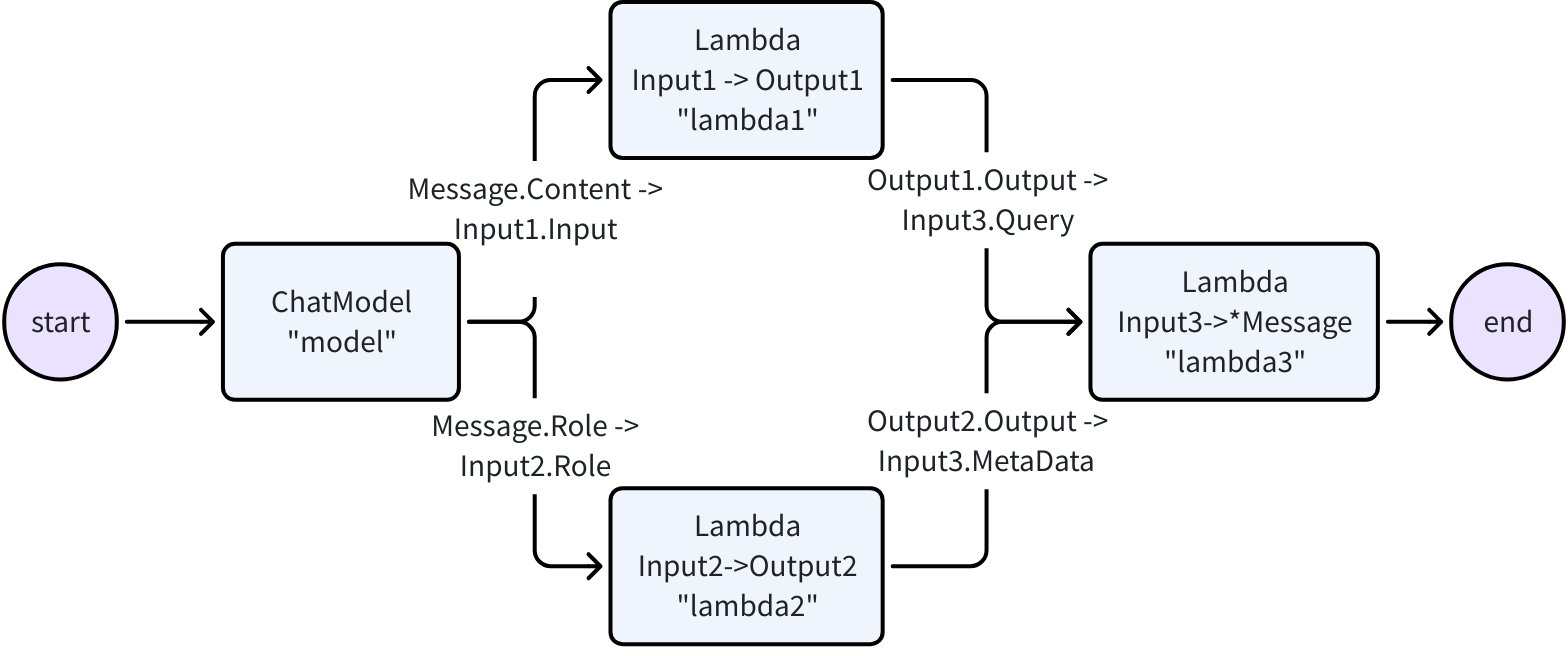
Now, let’s create a Workflow that can flexibly map inputs and outputs at the field level:
type Input1 struct {
    Input string
}

type Output1 struct {
    Output string
}

type Input2 struct {
    Role schema.RoleType
}

type Output2 struct {
    Output string
}

type Input3 struct {
    Query string
    MetaData string
}

var (
    ctx context.Context
    m model.BaseChatModel
    lambda1 func(context.Context, Input1) (Output1, error)
    lambda2 func(context.Context, Input2) (Output2, error)
    lambda3 func(context.Context, Input3) (*schema.Message, error)
)

wf := NewWorkflow[[]*schema.Message, *schema.Message]()
wf.AddChatModelNode("model", m).AddInput(START)
wf.AddLambdaNode("lambda1", InvokableLambda(lambda1)).
    AddInput("model", MapFields("Content", "Input"))
wf.AddLambdaNode("lambda2", InvokableLambda(lambda2)).
    AddInput("model", MapFields("Role", "Role"))
wf.AddLambdaNode("lambda3", InvokableLambda(lambda3)).
    AddInput("lambda1", MapFields("Output", "Query")).
    AddInput("lambda2", MapFields("Output", "MetaData"))
wf.End().AddInput("lambda3")
runnable, err := wf.Compile(ctx)
if err != nil {
    return err
}
our, err := runnable.Invoke(ctx, []*schema.Message{
    schema.UserMessage("kick start this workflow!"),
})
Eino’s graph orchestration provides the following capabilities out of the box:
- Type Checking: Ensures that the input and output types of two nodes match at compile time.
- Stream Processing: Concatenates message streams before passing them to ChatModel and ToolsNode nodes when needed, and copies the stream to callback handlers.
- Concurrency Management: Since StatePreHandler is thread-safe, shared state can be safely read and written.
- Aspect Injection: If the specified ChatModel implementation does not inject callbacks itself, callback aspects will be injected before and after ChatModel execution.
- Option Assignment: Invoke Options can be set globally, or for specific component types or specific nodes.
For example, you can easily extend compiled graphs with callbacks:
handler := NewHandlerBuilder().
  OnStartFn(
    func(ctx context.Context, info *RunInfo, input CallbackInput) context.Context) {
        log.Infof("onStart, runInfo: %v, input: %v", info, input)
    }).
  OnEndFn(
    func(ctx context.Context, info *RunInfo, output CallbackOutput) context.Context) {
        log.Infof("onEnd, runInfo: %v, out: %v", info, output)
    }).
  Build()

compiledGraph.Invoke(ctx, input, WithCallbacks(handler))
Or you can easily assign options to different nodes:
// assign to All nodes
compiledGraph.Invoke(ctx, input, WithCallbacks(handler))

// assign only to ChatModel nodes
compiledGraph.Invoke(ctx, input, WithChatModelOption(WithTemperature(0.5))

// assign only to node_1
compiledGraph.Invoke(ctx, input, WithCallbacks(handler).DesignateNode("node_1"))
Now, let’s create a “ReAct” agent: a ChatModel bound with some Tools. It receives input messages, autonomously decides whether to call a Tool or output the final result. The Tool execution result becomes the input message to the chat model again, serving as context for the next round of autonomous decision-making.
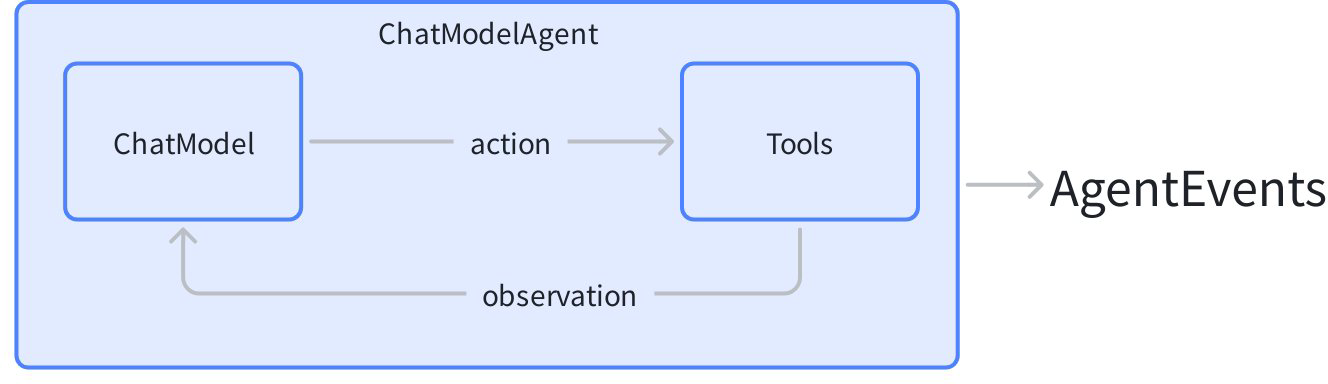
Eino’s Agent Development Kit (ADK) provides the out-of-the-box ChatModelAgent to implement this pattern:
agent, _ := adk.NewChatModelAgent(ctx, &adk.ChatModelAgentConfig{
    Name:        "assistant",
    Description: "A helpful assistant that can use tools",
    Model:       chatModel,
    ToolsConfig: adk.ToolsConfig{
        ToolsNodeConfig: compose.ToolsNodeConfig{
            Tools: []tool.BaseTool{weatherTool, calculatorTool},
        },
    },
})

runner := adk.NewRunner(ctx, adk.RunnerConfig{Agent: agent})
iter := runner.Query(ctx, "What's the weather in Beijing this weekend?")
for {
    event, ok := iter.Next()
    if !ok {
        break
    }
    // process agent events (model outputs, tool calls, etc.)
}
ADK handles the ReAct loop internally, emitting events for each step of the agent reasoning process.
Beyond the basic ReAct pattern, ADK also provides powerful capabilities for building production-grade agent systems:
Multi-Agent and Context Management: Agents can transfer control to sub-agents or be wrapped as tools. The framework automatically manages conversation context across agent boundaries:
// Set up agent hierarchy - mainAgent can now transfer to sub-agents
mainAgentWithSubs, _ := adk.SetSubAgents(ctx, mainAgent, []adk.Agent{researchAgent, codeAgent})
When mainAgent transfers to researchAgent, conversation history is automatically rewritten to provide appropriate context for the sub-agent.
Agents can also be wrapped as tools, allowing one agent to call another within its tool-calling workflow:
// Wrap agent as a tool that can be called by other agents
researchTool := adk.NewAgentTool(ctx, researchAgent)
Interrupt Anywhere, Resume Directly: Any agent can pause execution to wait for human approval or external input, and resume precisely from where it was interrupted:
// Inside a tool or agent, trigger an interrupt
return adk.Interrupt(ctx, "Please confirm this action")

// Later, resume from checkpoint
iter, _ := runner.Resume(ctx, checkpointID)
Pre-built Agent Patterns: Out-of-the-box implementations for common architectures:
// Deep Agent: A battle-tested pattern for complex task orchestration,
// with built-in task management, sub-agent delegation, and progress tracking
deepAgent, _ := deep.New(ctx, &deep.Config{
    Name:        "deep_agent",
    Description: "An agent that breaks down and executes complex tasks",
    ChatModel:   chatModel,
    SubAgents:   []adk.Agent{researchAgent, codeAgent},
    ToolsConfig: adk.ToolsConfig{...},
})

// Supervisor pattern: one agent coordinates multiple experts
supervisorAgent, _ := supervisor.New(ctx, &supervisor.Config{
    Supervisor: coordinatorAgent,
    SubAgents:  []adk.Agent{writerAgent, reviewerAgent},
})

// Sequential execution: agents run in sequence
seqAgent, _ := adk.NewSequentialAgent(ctx, &adk.SequentialAgentConfig{
    SubAgents: []adk.Agent{plannerAgent, executorAgent, summarizerAgent},
})
Extensible Middleware System: Add capabilities to agents without modifying core logic:
fsMiddleware, _ := filesystem.NewMiddleware(ctx, &filesystem.Config{
    Backend: myFileSystem,
})

agent, _ := adk.NewChatModelAgent(ctx, &adk.ChatModelAgentConfig{
    // ...
    Middlewares: []adk.AgentMiddleware{fsMiddleware},
})
Key Features
Rich Components
- Common building blocks are abstracted as components, and each component abstraction has multiple out-of-the-box component implementations.
- Component abstractions such as ChatModel, Tool, PromptTemplate, Retriever, Document Loader, Lambda, etc.
- Each component type has its own interface: defined input and output types, defined option types, and reasonable stream processing paradigms.
- Implementation details are transparent. When orchestrating components, you only need to focus on the abstraction level.
- Implementations can be nested and contain complex business logic.
- ReAct Agent, MultiQueryRetriever, Host MultiAgent, etc. They consist of multiple components and complex business logic.
- From the outside, their implementation details remain transparent. For example, MultiQueryRetriever can be used anywhere that accepts a Retriever.
Agent Development Kit (ADK)
The ADK package provides high-level abstractions optimized for building AI agents:
- ChatModelAgent: ReAct-style agent that automatically handles tool calls, conversation state, and reasoning loops.
- Multi-Agent and Context Engineering: Build hierarchical agent systems where conversation history is automatically managed during agent transfers and agent-as-tool calls, enabling seamless context sharing between specialized agents.
- Workflow Agents: Combine agents using
SequentialAgent,ParallelAgent, andLoopAgentfor complex execution flows. - Human-in-the-Loop:
InterruptandResumemechanism with checkpoint persistence for workflows requiring human approval or input. - Pre-built Patterns: Out-of-the-box implementations including Deep Agent (task orchestration), Supervisor (hierarchical coordination), and Plan-Execute-Replan.
- Agent Middleware: Extensible middleware system for adding tools (filesystem operations) and managing context (token reduction).
Powerful Orchestration (Graph/Chain/Workflow)
For fine-grained control, Eino provides graph orchestration capabilities where data flows from Retriever / Document Loader / ChatTemplate to ChatModel, then to Tool, and is parsed into the final answer.
- Component instances are Nodes of the graph, and Edges are data flow channels.
- Graph orchestration is powerful and flexible enough to implement complex business logic:
- Type checking, stream processing, concurrency management, aspect injection, and option assignment are all handled by the framework.
- Branch execution at runtime, read and write global State, or use Workflow for field-level data mapping.
Callbacks
Callbacks handle cross-cutting concerns such as logging, tracing, and metrics. Callbacks can be applied directly to components, orchestration graphs, or ADK agents.
- Five callback types are supported: OnStart, OnEnd, OnError, OnStartWithStreamInput, OnEndWithStreamOutput.
- Custom callback handlers can be added at runtime via Options.
Complete Stream Processing
- Stream data processing is important because ChatModel outputs fragments of complete messages in real-time as it generates them. This becomes especially important in orchestration scenarios where more components need to handle fragmented message data.
- For downstream nodes that only accept non-streaming input (like ToolsNode), Eino automatically concatenates the stream.
- During graph execution, when a stream is needed, Eino automatically converts non-streaming to streaming.
- When multiple streams converge to a single downstream node, Eino automatically merges these streams.
- When a stream is passed to multiple different downstream nodes or to callback handlers, Eino automatically copies these streams.
- Orchestration elements like Branch or StateHandler are also stream-aware and can handle streams.
- With these stream data processing capabilities, whether a component “can handle streams or will output streams” becomes transparent to users.
- Compiled Graphs can be run with 4 different stream input/output paradigms:
| Stream Processing Paradigm | Explanation |
| Invoke | Receives non-stream type I, returns non-stream type O |
| Stream | Receives non-stream type I, returns stream type StreamReader[O] |
| Collect | Receives stream type StreamReader[I], returns non-stream type O |
| Transform | Receives stream type StreamReader[I], returns stream type StreamReader[O] |
Eino Framework Structure
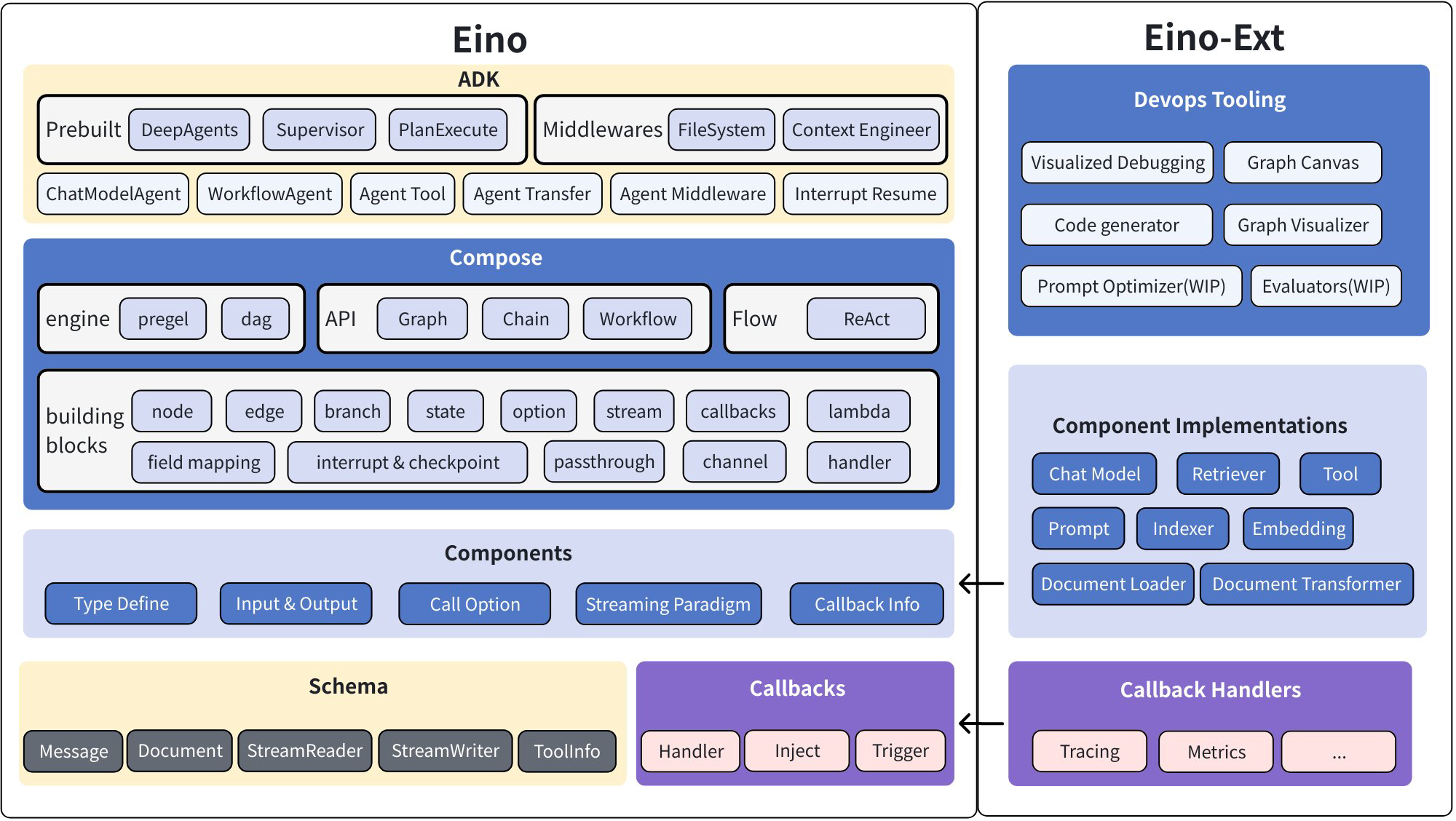
The Eino framework consists of several parts:
- Eino: Contains type definitions, stream data processing mechanisms, component abstraction definitions, orchestration functionality, callback mechanisms, etc.
- EinoExt: Component implementations, callback handler implementations, component usage examples, and various tools such as evaluators, prompt optimizers, etc.
💡 For components used internally at ByteDance, there are corresponding internal code repositories:
EinoBytedExt: https://code.byted.org/flow/eino-byted-ext
Contains component implementations currently positioned for internal use, such as llmgateway, bytedgpt, fornax tracing, bytees, etc.
- Eino Devops: Visual development, visual debugging, etc.
- EinoExamples: A code repository containing example applications and best practices.
See: [Eino Framework Structure Description](/docs/eino/overview/Eino Framework Structure Description)
Detailed Documentation
For learning and using Eino, we provide comprehensive Eino user manuals to help you quickly understand concepts in Eino and master the skills of designing AI applications based on Eino. Get started with the Eino User Manual~
For a quick start to understand the process of building AI applications with Eino, we recommend first reading Eino: Quick Start
Complete API Reference: https://pkg.go.dev/github.com/cloudwego/eino
Dependency Requirements
- Go 1.18 and above
Code Standards
This repository has enabled golangci-lint checking to enforce basic code standards. You can check locally with the following command:
golangci-lint run ./...
Main rules include:
- Exported functions, interfaces, packages, etc. need to have comments that comply with GoDoc standards.
- Code format must comply with
gofmt -sstandards. - Import order must comply with
goimportsstandards (std -> third party -> local).
Security
If you find a potential security issue in this project, or if you think you may have found a security issue, please notify the ByteDance security team through our Security Center or Vulnerability Report Email.
Please do not create public GitHub Issues.
Contact Us
- How to become a member: COMMUNITY MEMBERSHIP
- Issues: Issues
- Lark user group (scan the QR code to join the group after registering Lark)
- ByteDance internal OnCall group
Open Source License
This project is licensed under the [Apache-2.0 License].