Middleware: FileSystem
💡 Package: https://github.com/cloudwego/eino/tree/main/adk/middlewares/filesystem
Overview
FileSystem Middleware provides Agents with file system access and large tool result offloading capabilities. It defines a unified file system Backend interface, allowing users to use the default in-memory implementation directly or extend custom backends based on their needs.
Core features include:
- Access to virtual file system (ls/read/write/edit/glob/grep)
- Automatically offload oversized tool results to the file system, keeping summaries in the Agent context with content loaded on demand
Backend Interface
FileSystem Middleware operates on the file system through the Backend interface in github.com/cloudwego/eino/adk/filesystem:
type Backend interface {
    // List files at the specified path (structured information)
    LsInfo(path string) ([]FileInfo, error)
    // Read file content by offset and limit (returns LLM-friendly text)
    Read(ctx context.Context, filePath string, offset, limit int) (string, error)
    // Grep pattern in the specified path, returns list of matches
    GrepRaw(ctx context.Context, pattern string, path, glob *string) ([]GrepMatch, error)
    // Glob match based on pattern and path
    GlobInfo(ctx context.Context, pattern, path string) ([]FileInfo, error)
    // Write or update a file
    Write(ctx context.Context, filePath, content string) error
    // Replace string in a file
    Edit(ctx context.Context, filePath, oldString, newString string, replaceAll bool) error
}
Extended Interfaces
type Shell interface {
    Execute(ctx context.Context, input *ExecuteRequest) (result *ExecuteResponse, err error)
}

type StreamingShell interface {
    ExecuteStreaming(ctx context.Context, input *ExecuteRequest) (result *schema.StreamReader[*ExecuteResponse], err error)
}
InMemoryBackend is an in-memory implementation of the Backend interface, storing files in a map with concurrent-safe access.
import "github.com/cloudwego/eino/adk/filesystem"

ctx := context.Background()
backend := filesystem.NewInMemoryBackend()

// Write a file
err := backend.Write(ctx, &filesystem.WriteRequest{
    FilePath: "/example/test.txt",
    Content:  "Hello, World!\nLine 2\nLine 3",
})

// Read a file
content, err := backend.Read(ctx, &filesystem.ReadRequest{
    FilePath: "/example/test.txt",
    Offset:   1,
    Limit:    10,
})

// List directory
files, err := backend.LsInfo(ctx, &filesystem.LsInfoRequest{
    Path: "/example",
})

// Search content
matches, err := backend.GrepRaw(ctx, &filesystem.GrepRequest{
    Pattern: "Hello",
    Path:    "/example",
})

// Edit a file
err = backend.Edit(ctx, &filesystem.EditRequest{
    FilePath:   "/example/test.txt",
    OldString:  "Hello",
    NewString:  "Hi",
    ReplaceAll: false,
})
Other Backend implementations:
Filesystem Middleware
The Middleware automatically injects a set of tools and corresponding system prompts into the Agent, enabling it to directly operate on the file system.
Creating the Middleware
It is recommended to use the New function to create the middleware (returns ChatModelAgentMiddleware):
import "github.com/cloudwego/eino/adk/middlewares/filesystem"

middleware, err := filesystem.New(ctx, &filesystem.MiddlewareConfig{
    Backend: myBackend,
    // Set Shell or StreamingShell if shell command execution capability is needed
    Shell: myShell,
})
if err != nil {
    // handle error
}

agent, err := adk.NewChatModelAgent(ctx, &adk.ChatModelAgentConfig{
    // ...
    Middlewares: []adk.ChatModelAgentMiddleware{middleware},
})
Config Options
type MiddlewareConfig struct {
    // Backend provides file system operations, required
    Backend filesystem.Backend

    // Shell provides shell command execution capability
    // If set, the execute tool will be registered
    // Optional, mutually exclusive with StreamingShell
    Shell filesystem.Shell

    // StreamingShell provides streaming shell command execution capability
    // If set, the streaming execute tool will be registered
    // Optional, mutually exclusive with Shell
    StreamingShell filesystem.StreamingShell

    // CustomSystemPrompt overrides the default system prompt
    // Optional, defaults to ToolsSystemPrompt
    CustomSystemPrompt *string

    // Custom names for each tool, all optional
    CustomLsToolName        *string  // default "ls"
    CustomReadFileToolName  *string  // default "read_file"
    CustomWriteFileToolName *string  // default "write_file"
    CustomEditFileToolName  *string  // default "edit_file"
    CustomGlobToolName      *string  // default "glob"
    CustomGrepToolName      *string  // default "grep"
    CustomExecuteToolName   *string  // default "execute"

    // Custom descriptions for each tool, all optional
    CustomLsToolDesc        *string
    CustomReadFileToolDesc  *string
    CustomGrepToolDesc      *string
    CustomGlobToolDesc      *string
    CustomWriteFileToolDesc *string
    CustomEditToolDesc      *string
    CustomExecuteToolDesc   *string
}
💡 The
Newfunction returnsChatModelAgentMiddleware, providing better context propagation capabilities. For scenarios requiring large tool result offloading, please use theNewMiddlewarefunction or use it together with the ToolReduction middleware.
Injected tools:
These tools all come with default English descriptions and built-in system prompts. To switch to Chinese, you can set it via adk.SetLanguage():
import "github.com/cloudwego/eino/adk"

adk.SetLanguage(adk.LanguageChinese)  // Switch to Chinese
adk.SetLanguage(adk.LanguageEnglish)  // Switch to English (default)
You can also customize the description text and tool names through Config:
type MiddlewareConfig struct {
    // Override default System Prompt (optional)
    CustomSystemPrompt *string

    // Override tool names (optional)
    CustomLsToolName        *string
    CustomReadFileToolName  *string
    // ...

    // Override tool descriptions (optional)
    CustomLsToolDesc        *string
    CustomReadFileToolDesc  *string
    // ...
}
[deprecated] Tool Result Offloading
💡 This feature will be deprecated in 0.8.0. Migrate to Middleware: ToolReduction
When tool call results are too large (e.g., reading large files, grep hitting a lot of content), continuing to put the complete results in the conversation context will cause:
- Token count increases dramatically
- Agent history context pollution
- Inference efficiency deterioration
To address this, the Middleware provides an automatic offloading mechanism:
- When the result size exceeds the threshold (default 20,000 tokens) → The complete content is not returned directly to the LLM
- The actual result is saved to the file system
- The context only includes:
- Summary
- File path (agent can call the tool again to read it)
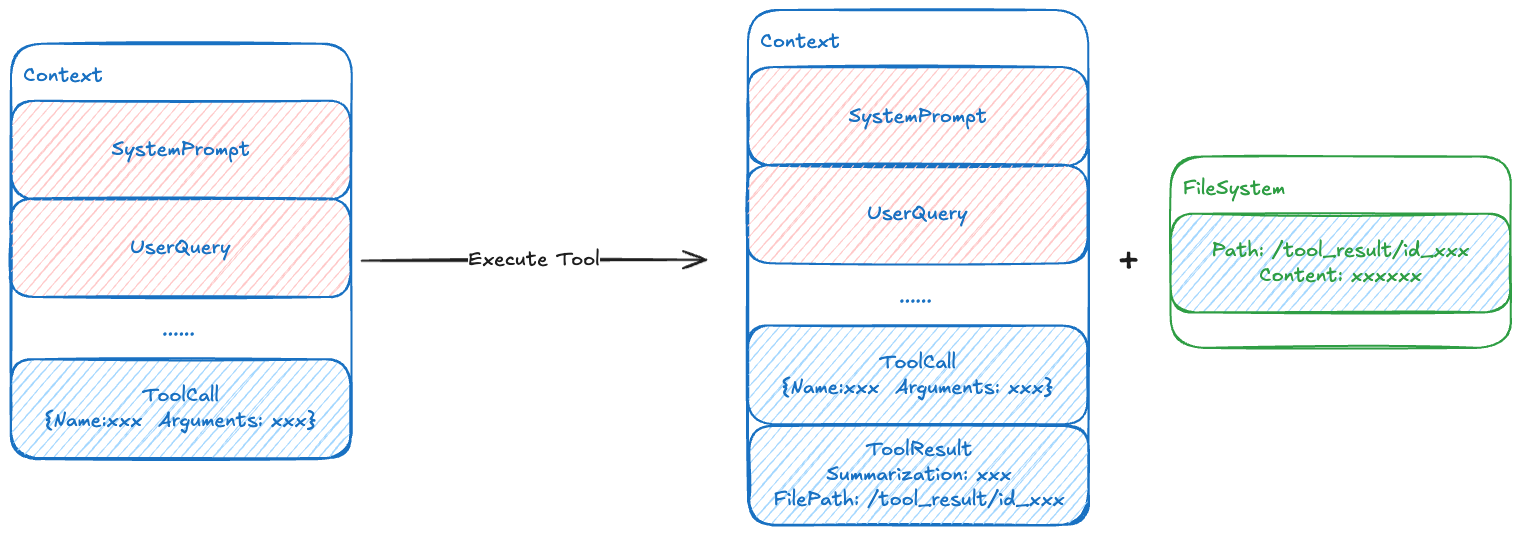
This feature is enabled by default and behavior can be adjusted through configuration:
type Config struct {
    // other config...

    // Disable automatic offloading
    WithoutLargeToolResultOffloading bool

    // Custom trigger threshold (default 20000 tokens)
    LargeToolResultOffloadingTokenLimit int

    // Custom offload file path generation
    // Default path format: /large_tool_result/{ToolCallID}
    LargeToolResultOffloadingPathGen func(ctx context.Context, input *compose.ToolInput) (string, error)
}