Eino ADK: Plan-Execute Agent
Plan-Execute Agent Overview
Import Path
import github.com/cloudwego/eino/adk/prebuilt/planexecute
What is Plan-Execute Agent?
Plan-Execute Agent is a multi-agent collaboration framework based on the “plan-execute-reflect” paradigm in Eino ADK, designed to solve the step-by-step decomposition, execution, and dynamic adjustment of complex tasks. Through the collaborative work of three core agents: Planner, Executor, and Replanner, it achieves structured task planning, tool call execution, progress evaluation, and dynamic replanning to ultimately accomplish user goals.
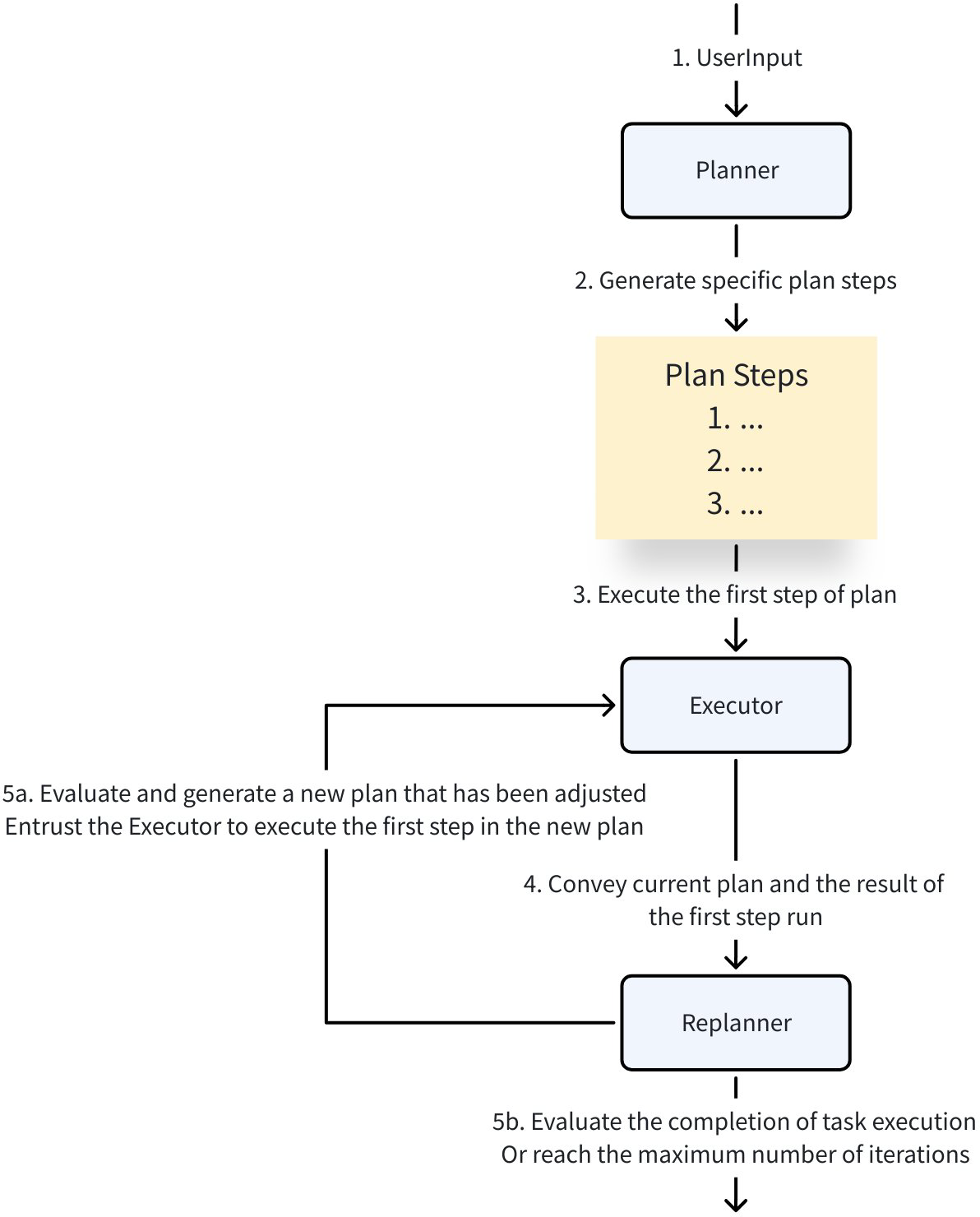
Plan-Execute Agent is suitable for scenarios requiring multi-step reasoning, tool integration, or dynamic strategy adjustment (such as research analysis, complex problem solving, automated workflows, etc.). Its core advantages are:
- Structured Planning: Decomposes complex tasks into clear, executable step sequences
- Iterative Execution: Completes single-step tasks based on tool calls, accumulating execution results
- Dynamic Adjustment: Evaluates in real-time based on execution progress whether the plan needs adjustment or task termination
- Model and Tool Agnostic: Compatible with any model supporting tool calls, flexible integration with external tools
Plan-Execute Agent Structure
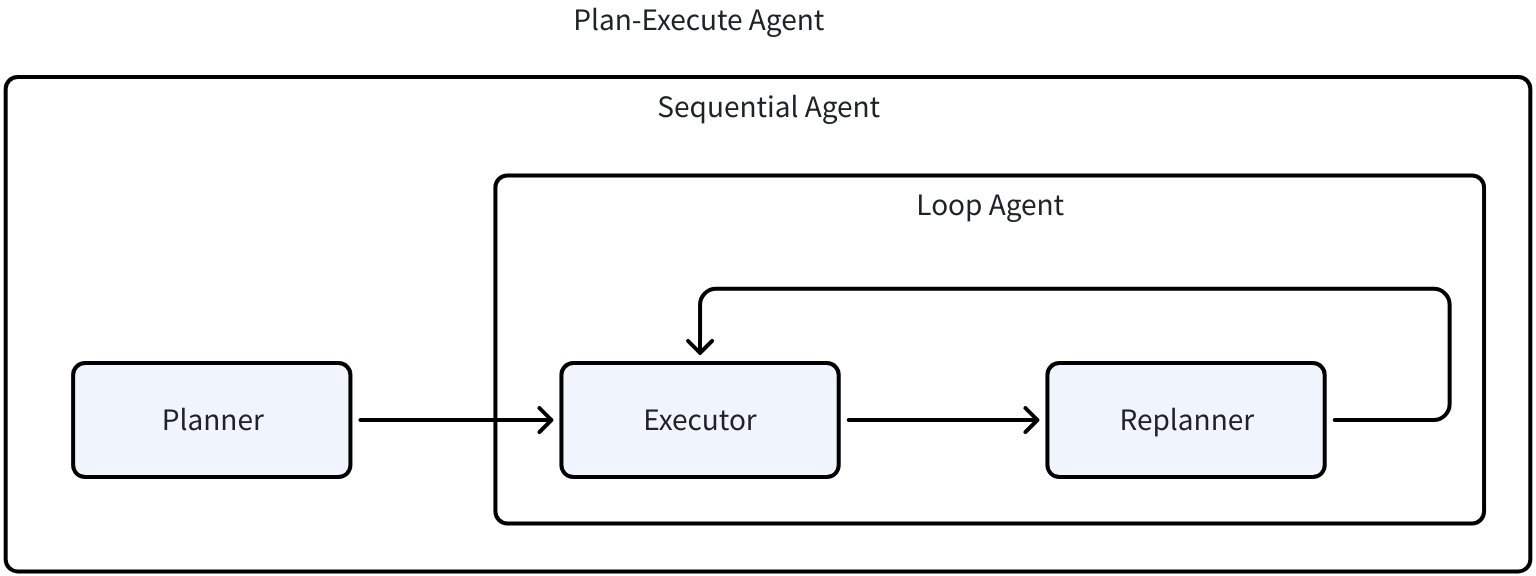
Plan-Execute Agent consists of three core agents and a coordinator, built together using ChatModelAgent and WorkflowAgents capabilities provided in ADK:
1. Planner
- Core Function: Generates initial task plan (structured step sequence) based on user goals
- Implementation:
- Uses a model supporting tool calls (e.g., GPT-4) to generate a step list conforming to JSON Schema via
PlanTool - Or directly uses a model supporting structured output to generate
Planformat results
- Uses a model supporting tool calls (e.g., GPT-4) to generate a step list conforming to JSON Schema via
- Output:
Planobject (containing ordered step list), stored in Session for subsequent process use
// PlannerConfig provides configuration options for creating a planner agent.
// There are two ways to configure the planner to generate structured Plan output:
//  1. Use ChatModelWithFormattedOutput: A model already configured to output in the Plan format
//  2. Use ToolCallingChatModel + ToolInfo: A model that will be configured to use tool calling
//     to generate the Plan structure
type PlannerConfig struct {
    // ChatModelWithFormattedOutput is a model pre-configured to output in the Plan format.
    // This can be created by configuring a model to output structured data directly.
    // Can refer to https://github.com/cloudwego/eino-ext/blob/main/components/model/openai/examples/structured/structured.go.
    ChatModelWithFormattedOutput model.BaseChatModel

    // ToolCallingChatModel is a model that supports tool calling capabilities.
    // When provided along with ToolInfo, the model will be configured to use tool calling
    // to generate the Plan structure.
    ToolCallingChatModel model.ToolCallingChatModel
    // ToolInfo defines the schema for the Plan structure when using tool calling.
    // If not provided, PlanToolInfo will be used as the default.
    ToolInfo *schema.ToolInfo

    // GenInputFn is a function that generates the input messages for the planner.
    // If not provided, defaultGenPlannerInputFn will be used as the default.
    GenInputFn GenPlannerInputFn

    // NewPlan creates a new Plan instance for JSON.
    // The returned Plan will be used to unmarshal the model-generated JSON output.
    // If not provided, defaultNewPlan will be used as the default.
    NewPlan NewPlan
}
2. Executor
- Core Function: Executes the first step in the plan, calling external tools to complete specific tasks
- Implementation: Based on
ChatModelAgent, configured with tool sets (such as search, calculation, database access, etc.) - Workflow:
- Gets current
Planand executed steps from Session - Extracts the first unexecuted step from the plan as the goal
- Calls tools to execute the step, stores results in Session
- Gets current
- Key Capability: Supports multi-round tool calls (controlled via
MaxIterations) to ensure single-step task completion
// ExecutorConfig provides configuration options for creating a executor agent.
type ExecutorConfig struct {
    // Model is the chat model used by the executor.
    Model model.ToolCallingChatModel

    // ToolsConfig is the tools configuration used by the executor.
    ToolsConfig adk.ToolsConfig

    // MaxIterations defines the upper limit of ChatModel generation cycles.
    // The agent will terminate with an error if this limit is exceeded.
    // Optional. Defaults to 20.
    MaxIterations int

    // GenInputFn is the function that generates the input messages for the Executor.
    // Optional. If not provided, defaultGenExecutorInputFn will be used.
    GenInputFn GenPlanExecuteInputFn
}
3. Replanner
- Core Function: Evaluates execution progress, decides to continue execution (generate new plan) or terminate task (return result)
- Implementation: Based on tool calling model, outputs decisions via
PlanTool(generate new plan) orRespondTool(return result) - Decision Logic:
- Continue Execution: If goal not achieved, generates new plan containing remaining steps, updates
Planin Session - Terminate Task: If goal achieved, calls
RespondToolto generate final user response
- Continue Execution: If goal not achieved, generates new plan containing remaining steps, updates
type ReplannerConfig struct {

    // ChatModel is the model that supports tool calling capabilities.
    // It will be configured with PlanTool and RespondTool to generate updated plans or responses.
    ChatModel model.ToolCallingChatModel

    // PlanTool defines the schema for the Plan tool that can be used with ToolCallingChatModel.
    // If not provided, the default PlanToolInfo will be used.
    PlanTool *schema.ToolInfo

    // RespondTool defines the schema for the response tool that can be used with ToolCallingChatModel.
    // If not provided, the default RespondToolInfo will be used.
    RespondTool *schema.ToolInfo

    // GenInputFn is the function that generates the input messages for the Replanner.
    // if not provided, buildDefaultReplannerInputFn will be used.
    GenInputFn GenPlanExecuteInputFn

    // NewPlan creates a new Plan instance.
    // The returned Plan will be used to unmarshal the model-generated JSON output from PlanTool.
    // If not provided, defaultNewPlan will be used as the default.
    NewPlan NewPlan
}
4. PlanExecuteAgent
- Core Function: Combines the above three agents to form a “plan → execute → replan” loop workflow
- Implementation: Combined via
SequentialAgentandLoopAgent:- Outer
SequentialAgent: First executesPlannerto generate initial plan, then enters execute-replan loop - Inner
LoopAgent: Loops execution ofExecutorandReplanneruntil task completion or maximum iterations reached
- Outer
// New creates a new plan execute agent with the given configuration.
func New(ctx context.Context, cfg *PlanExecuteConfig) (adk.Agent, error)

// Config provides configuration options for creating a plan execute agent.
type Config struct {
    Planner       adk.Agent
    Executor      adk.Agent
    Replanner     adk.Agent
    MaxIterations int
}
Plan-Execute Agent Execution Flow
The complete workflow of Plan-Execute Agent is as follows:
- Initialization: User inputs target task, starts
PlanExecuteAgent - Planning Phase:
Plannerreceives user goal, generates initialPlan(step list)Planstored in Session (PlanSessionKey)
- Execute-Replan Loop (controlled by
LoopAgent):- Execution Step:
Executorextracts first step fromPlan, calls tools to execute, result stored in Session (ExecutedStepsSessionKey) - Reflection Step:
Replannerevaluates executed steps and results:- If goal achieved: Calls
RespondToolto generate final response, exits loop - If needs to continue: Generates new
Planand updates Session, enters next loop iteration
- If goal achieved: Calls
- Execution Step:
- Termination Condition: Task completed (
Replannerreturns result) or maximum iterations reached (MaxIterations)
Plan-Execute Agent Usage Example
Scenario Description
Implement a “research” Agent:
- Planner: Plans detailed steps for research goals
- Executor: Executes the first step in the plan, uses search tool (duckduckgo) when necessary
- Replanner: Evaluates execution results, adjusts plan if information is insufficient, otherwise generates final summary
Code Implementation
1. Initialize Model and Tools
// Initialize OpenAI model supporting tool calls
func newToolCallingModel(ctx context.Context) model.ToolCallingChatModel {
    cm, err := openai.NewChatModel(ctx, &openai.ChatModelConfig{
        APIKey: os.Getenv("OPENAI_API_KEY"),
        Model:  "gpt-4o", // Must support tool calls
    })
    if err != nil {
        log.Fatalf("Failed to initialize model: %v", err)
    }
    return cm
}

// Initialize search tool (for Executor to call)
func newSearchTool(ctx context.Context) tool.BaseTool {
    config := &duckduckgo.Config{
       MaxResults: 20, // Limit to return 20 results
       Region:     duckduckgo._RegionWT_,
       Timeout:    10 * time._Second_,
    }
    tool, err := duckduckgo.NewTextSearchTool(ctx, config)
    if err != nil {
       log.Fatalf("Failed to initialize search tool: %v", err)
    }
    return tool
}
2. Create Planner
func newPlanner(ctx context.Context, model model.ToolCallingChatModel) adk.Agent {
    planner, err := planexecute.NewPlanner(ctx, &planexecute.PlannerConfig{
        ToolCallingChatModel: model,                  // Use tool calling model to generate plan
        ToolInfo:             &planexecute.PlanToolInfo, // Default Plan tool schema
    })
    if err != nil {
        log.Fatalf("Failed to create Planner: %v", err)
    }
    return planner
}
3. Create Executor
func newExecutor(ctx context.Context, model model.ToolCallingChatModel) adk.Agent {
    // Configure Executor tool set (only includes search tool)
    toolsConfig := adk.ToolsConfig{
       ToolsNodeConfig: compose.ToolsNodeConfig{
          Tools: []tool.BaseTool{newSearchTool(ctx)},
       },
    }
    executor, err := planexecute.NewExecutor(ctx, &planexecute.ExecutorConfig{
       Model:       model,
       ToolsConfig: toolsConfig,
       MaxIterations:     5, // ChatModel runs at most 5 times
    })
    if err != nil {
       log.Fatalf("Failed to create Executor: %v", err)
    }
    return executor
}
4. Create Replanner
func newReplanner(ctx context.Context, model model.ToolCallingChatModel) adk.Agent {
    replanner, err := planexecute.NewReplanner(ctx, &planexecute.ReplannerConfig{
       ChatModel: model, // Use tool calling model to evaluate progress
    })
    if err != nil {
       log.Fatalf("Failed to create Replanner: %v", err)
    }
    return replanner
}
5. Combine into PlanExecuteAgent
func newPlanExecuteAgent(ctx context.Context) adk.Agent {
    model := newToolCallingModel(ctx)

    // Instantiate three core agents
    planner := newPlanner(ctx, model)
    executor := newExecutor(ctx, model)
    replanner := newReplanner(ctx, model)

    // Combine into PlanExecuteAgent (fixed execute-replan max iterations 10)
    planExecuteAgent, err := planexecute.NewPlanExecuteAgent(ctx, &planexecute.PlanExecuteConfig{
       Planner:       planner,
       Executor:      executor,
       Replanner:     replanner,
       MaxIterations: 10,
    })
    if err != nil {
       log.Fatalf("Failed to combine PlanExecuteAgent: %v", err)
    }
    return planExecuteAgent
}
6. Run and Output
import (
    "context"
    "log"
    "os"
    "time"

    "github.com/cloudwego/eino-ext/components/model/openai"
    "github.com/cloudwego/eino-ext/components/tool/duckduckgo/v2"
    "github.com/cloudwego/eino/adk"
    "github.com/cloudwego/eino/adk/prebuilt/planexecute"
    "github.com/cloudwego/eino/components/model"
    "github.com/cloudwego/eino/components/tool"
    "github.com/cloudwego/eino/compose"
    "github.com/cloudwego/eino/schema"
)

func main() {
    ctx := context.Background()
    agent := newPlanExecuteAgent(ctx)

    // Create Runner to execute agent
    runner := adk.NewRunner(ctx, adk.RunnerConfig{Agent: agent, EnableStreaming: true})

    // User inputs target task
    userInput := []adk.Message{
       schema.UserMessage("Research and summarize the latest developments in AI for healthcare in 2024, including key technologies, applications, and industry trends."),
    }

    // Execute and print results
    events := runner.Run(ctx, userInput)
    for {
       event, ok := events.Next()
       if !ok {
          break
       }
       if event.Err != nil {
          log.Printf("Execution error: %v", event.Err)
          break
       }
       // Print agent output (plan, execution results, final response, etc.)
       if msg, err := event.Output.MessageOutput.GetMessage(); err == nil && msg.Content != "" {
          log.Printf("\n=== Agent Output ===\n%s\n", msg.Content)
       }
    }
}
Execution Results
2025/09/08 11:47:42
=== Agent:Planner Output ===
{"steps":["Identify the most recent and credible sources for AI developments in healthcare in 2024, such as scientific journals, industry reports, news articles, and expert analyses.","Extract and compile the key technologies emerging or advancing in AI for healthcare in 2024, including machine learning models, diagnostic tools, robotic surgery, personalized medicine, and data management solutions.","Analyze the main applications of AI in healthcare during 2024, focusing on areas such as diagnostics, patient care, drug discovery, medical imaging, and healthcare administration.","Investigate current industry trends related to AI in healthcare for 2024, including adoption rates, regulatory changes, ethical considerations, funding landscape, and market forecasts.","Synthesize the gathered information into a comprehensive summary covering the latest developments in AI for healthcare in 2024, highlighting key technologies, applications, and industry trends with examples and implications."]}
2025/09/08 11:47:47
=== Agent:Executor Output ===
{"message":"Found 10 results successfully.","results":[{"title":"Artificial Intelligence in Healthcare: 2024 Year in Review","url":"https://www.researchgate.net/publication/389402322_Artificial_Intelligence_in_Healthcare_2024_Year_in_Review","summary":"The adoption of LLMs and text data types amongst various healthcare specialties, especially for education and administrative tasks, is unlocking new potential for AI applications in..."},{"title":"AI in Healthcare - Nature","url":"https://www.nature.com/collections/hacjaaeafj","summary":"\"AI in Healthcare\" encompasses the use of AI technologies to enhance various aspects of healthcare delivery, from diagnostics to treatment personalization, ultimately aiming to improve..."},...]}
...
Summary
Plan-Execute Agent effectively improves task completion reliability and efficiency through the “plan-execute-reflect” closed-loop workflow, decomposing complex tasks into executable steps, combining tool calls with dynamic adjustment. Its core advantages are:
- Structured Task Decomposition: Reduces cognitive load of complex problems
- Tool Integration Capability: Seamlessly interfaces with external tools (search, calculation, database, etc.)
- Dynamic Adaptability: Adjusts strategies in real-time based on execution feedback to handle uncertainty
Through the PlanExecuteAgent provided by Eino ADK, developers can quickly build agent systems capable of handling complex tasks, suitable for various scenarios such as research analysis, office automation, intelligent customer service, etc.
FAQ
Error [NodeRunError] no tool call
Planner / Replanner must generate plans through tool calls. When this error occurs, please check:
- Whether the model used supports forced tool calls (e.g., openai tool_choice=“required”)
- Whether the model’s eino-ext wrapper has been upgraded to the latest version (e.g., old version ark sdk does not support forced tool calls)
Error [NodeRunError] unexpected tool call
The ChatModel registered with Replanner should not carry additional tools via the WithTools method. If this is the case, please clear the tools.
Error [NodeRunError] unmarshal plan error
In Planner / Replanner config, plans are generated based on two fields: PlanTool and NewPlan:
- PlanTool serves as the Plan description provided to the model
- NewPlan method serves as the framework’s plan builder, used to unmarshal the Plan returned by the model to this struct for subsequent step execution
When this error occurs, please check whether the field descriptions provided in PlanTool match the struct fields returned in the NewPlan method, align them and re-run.