Eino ADK: DeepAgents
DeepAgents Overview
DeepAgents is an out-of-the-box agent solution built on top of ChatModelAgent (see: Eino ADK: ChatModelAgent). You don’t need to assemble prompts, tools, or context management yourself - you can immediately get a runnable agent while still using ChatModelAgent’s extension capabilities to add business features, such as custom tools and middleware.
Included Features:
- Planning Capability — Task decomposition and progress tracking through
write_todos - File System — Provides
read_file,write_file,edit_file,ls,glob,grepfor reading and writing context - Shell Access — Use
executeto run commands - Sub-Agents — Delegate work to sub-agents with independent context windows via
task - Smart Default Configuration — Built-in prompts that teach the model how to efficiently use these tools
- Context Management — Automatic summarization for long conversation history, automatic file saving for large outputs
- SummarizationMiddleware, ReductionMiddleware are under development
ImportPath
Eino version must be >= v0.5.14
import github.com/cloudwego/eino/adk/prebuilt/deep

agent, err := deep.New(ctx, &deep.Config{})
DeepAgents Structure
The core concept of DeepAgents is to use a main agent (MainAgent) to coordinate, plan, delegate, or autonomously execute tasks. The main agent uses its built-in ChatModel and a series of tools to interact with the external world or decompose complex tasks to specialized sub-agents (SubAgents).
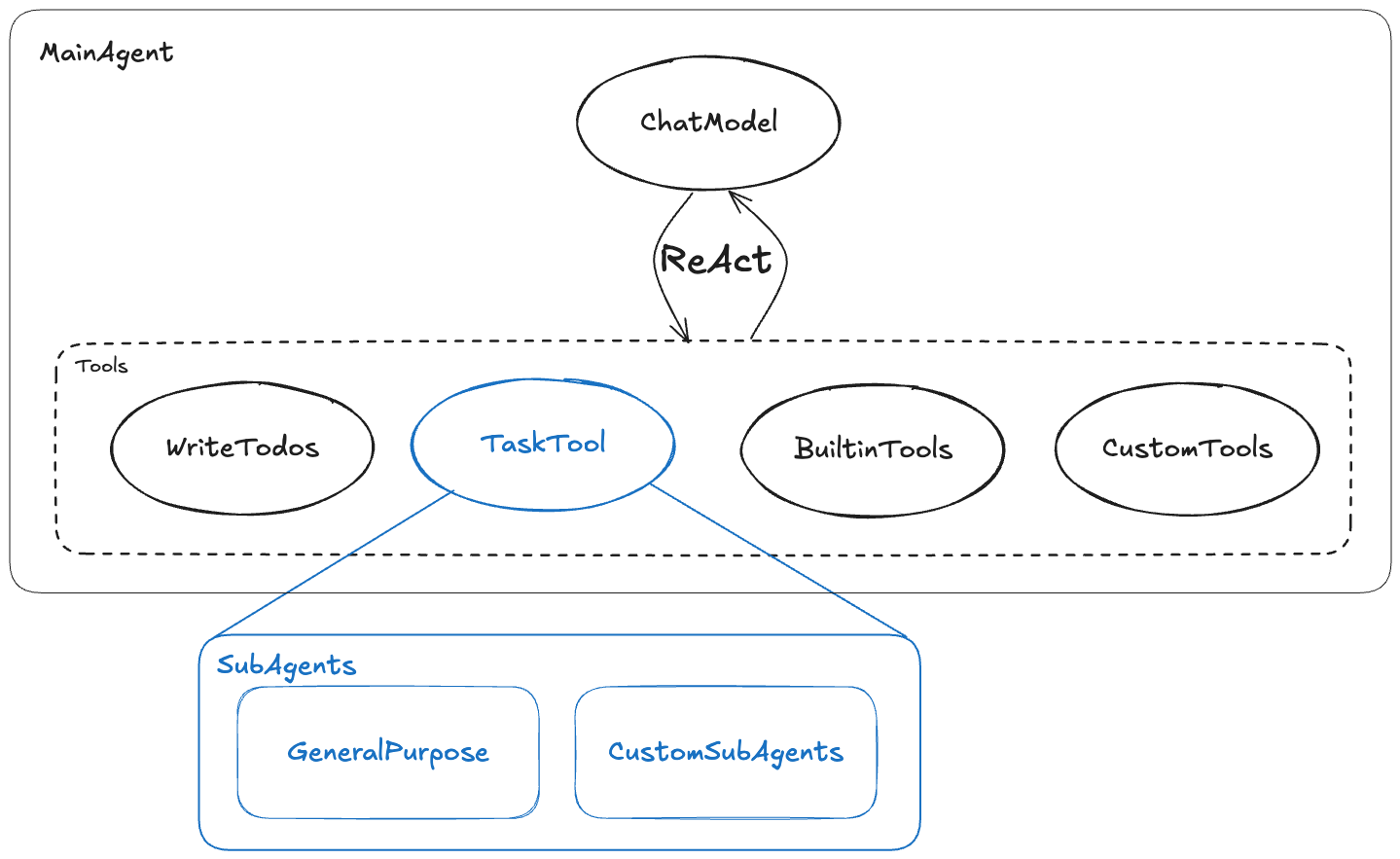
The diagram above shows the core components of DeepAgents and their relationships:
- Main Agent: The entry point and commander of the system, receives initial tasks, calls tools in ReAct mode to complete tasks and is responsible for presenting the final results.
- ChatModel (ToolCallingChatModel): Usually a large language model with tool-calling capabilities, responsible for understanding tasks, reasoning, selecting and calling tools.
- Tools: A collection of capabilities available to MainAgent, including:
- WriteTodos: Built-in planning tool for decomposing complex tasks into structured todo lists.
- TaskTool: A special tool that serves as the unified entry point for calling sub-agents.
- BuiltinTools, CustomTools: General tools built into DeepAgents and various tools customized by users according to business needs.
- SubAgents: Responsible for executing specific, independent subtasks, with context isolated from MainAgent.
- GeneralPurpose: A general-purpose sub-agent with the same tools as MainAgent (except TaskTool), used to execute subtasks in a “clean” context.
- CustomSubAgents: Various sub-agents customized by users according to business needs.
Built-in Capabilities
Filesystem
💡 Currently in alpha state
When creating DeepAgents, configure the relevant Backend, and DeepAgents will automatically load the corresponding tools:
type Config struct {
    // ...
    Backend filesystem.Backend
    Shell filesystem.Shell
    StreamingShell filesystem.StreamingShell
    // ...
}
| Configuration | Function | Added Tools |
| Backend | Provides file system access capability, optional | read_file, write_file, edit_file, glob, grep |
| Shell | Provides Shell capability, optional, mutually exclusive with StreamShell | execute |
| StreamingShell | Provides Shell capability with streaming results, optional, mutually exclusive with Shell | execute(streaming) |
DeepAgents implements built-in filesystem by referencing filesystem middleware. For more detailed capability description of this middleware, see: Middleware: FileSystem
Task Decomposition and Planning
The Description of WriteTodos describes the principles of task decomposition and planning. The main agent adds a subtask list to the context by calling the WriteTodos tool to inspire subsequent reasoning and execution processes:
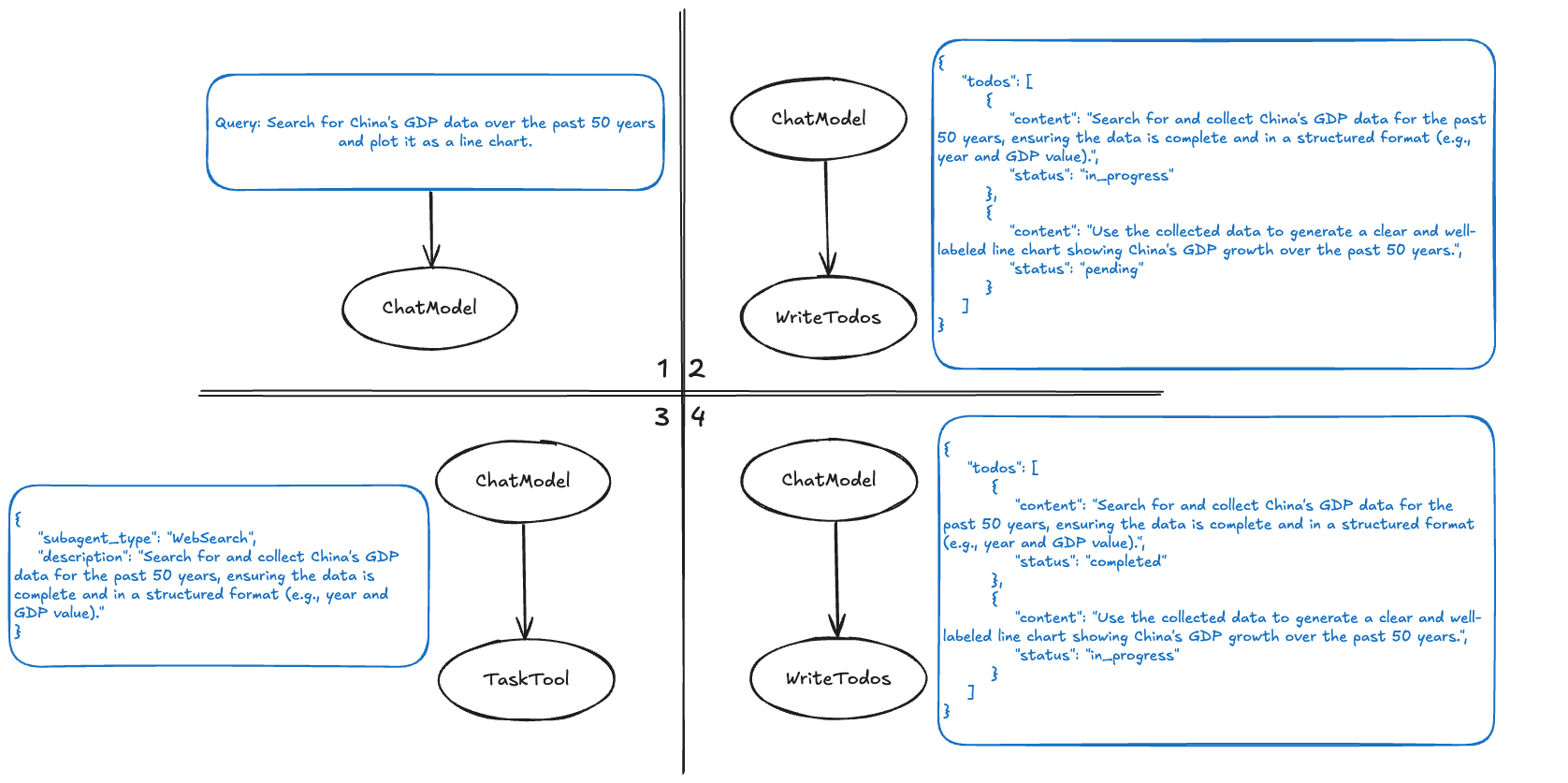
- The model receives user input.
- The model calls the WriteTodos tool with a task list generated according to the WriteTodos Description. This tool call is added to the context for future reference.
- The model calls TaskTool according to the todos in the context to complete the first todo.
- Calls WriteTodos again to update the Todos execution progress.
💡 For simple tasks, calling WriteTodos every time may have a negative effect. The WriteTodos Description includes some common positive and negative examples to avoid not calling or over-calling WriteTodos. When using DeepAgents, you can add more prompts according to actual business scenarios to make WriteTodos called at appropriate times.
💡 WriteTodos will be added to the Agent by default. Configure
WithoutWriteTodos=trueto disable WriteTodos.
Task Delegation and SubAgents Invocation
TaskTool
All sub-agents are bound to TaskTool. When the main agent assigns subtasks to sub-agents for processing, it calls TaskTool and specifies which sub-agent is needed and the task to execute. TaskTool then routes the task to the specified sub-agent and returns the result to the main agent after execution. The default Description of TaskTool explains the general rules for calling sub-agents and concatenates the Description of each sub-agent. Developers can customize the Description of TaskTool by configuring TaskToolDescriptionGenerator.
When users configure Config.SubAgents, these Agents will be bound to TaskTool based on ChatModelAgent’s AgentAsTool capability
Context Isolation
Context isolation between Agents:
- Information Transfer: The main agent and sub-agents do not share context. Sub-agents only receive the subtask goals assigned by the main agent, not the entire task processing; the main agent only receives the processing results from sub-agents, not the processing of sub-agents.
- Avoid Pollution: This isolation ensures that the execution process of sub-agents (such as numerous tool calls and intermediate steps) does not “pollute” the main agent’s context. The main agent only receives concise, clear final answers.
general-purpose
DeepAgents adds a sub-agent by default: general-purpose. general-purpose has the same system prompt and tools as the main agent (except TaskTool). When there is no specialized sub-agent to handle a task, the main agent can call general-purpose to isolate context. Developers can remove this agent by configuring WithoutGeneralSubAgent=true.
Comparison with Other Agents
-
Compared to ReAct Agent
- Advantages: DeepAgents strengthens task decomposition and planning through built-in WriteTodos; it also isolates multi-agent contexts, usually performing better in large-scale, multi-step tasks.
- Disadvantages: Making plans and calling sub-agents bring additional model requests, increasing latency and token costs; if task decomposition is unreasonable, it may have a negative effect.
-
Compared to Plan-and-Execute
- Advantages: DeepAgents provides Plan/RePlan as tools for the main agent to freely call, allowing unnecessary planning to be skipped during tasks, overall reducing model calls and lowering latency and costs.
- Disadvantages: Task planning and delegation are completed in one model call, requiring higher model capabilities, and prompt tuning is relatively more difficult.
DeepAgents Usage Example
Scenario Description
Excel Agent is an “intelligent assistant that understands Excel”. It first breaks down the problem into steps, then executes and verifies results step by step. It can understand user questions and uploaded file content, propose feasible solutions, and select appropriate tools (system commands, generate and run Python code, web queries, etc.) to complete tasks.
In real business, you can think of Excel Agent as an “Excel expert + automation engineer”. When you provide a raw spreadsheet and target description, it will propose a solution and complete the execution:
- Data Cleaning and Formatting: Complete deduplication, null value handling, and date format standardization from an Excel file containing large amounts of data.
- Data Analysis and Report Generation: Extract monthly sales totals from sales data, aggregate statistics, pivot, and finally generate and export chart reports.
- Automated Budget Calculation: Automatically calculate total budget based on budget applications from different departments and generate department budget allocation tables.
- Data Matching and Merging: Match and merge customer information tables from multiple different sources to generate a complete customer information database.
The structure of Excel Agent built with DeepAgents is as follows:
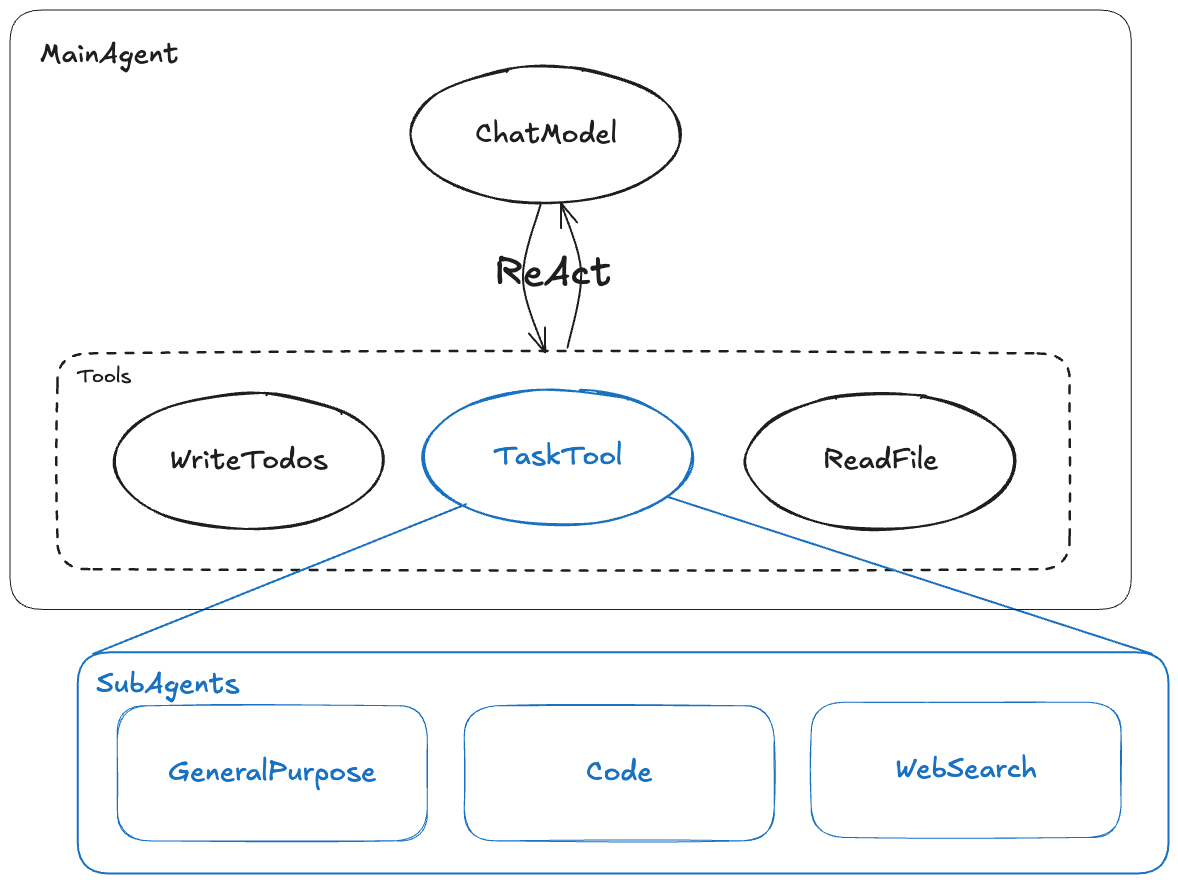
- Add ReadFile tool to the main agent, allowing the main agent to view file content and assist in subtask formulation
- Add Code and WebSearch sub-agents: Code can write python code to operate excel spreadsheets; WebSearch can search for information and summarize.
Code Implementation
https://github.com/cloudwego/eino-examples/tree/main/adk/multiagent/deep
Execution Results
name: ExcelAgent
path: [{ExcelAgent}]
tool name: task
arguments: {"subagent_type":"CodeAgent","description":"Please help me with a CSV file operation task. Specific requirements: 1. Read the questions.csv file in the current directory; 2. Extract the first column data from the CSV file; 3. Save the extracted first column data to a new CSV file named first_column.csv. Please use the pandas library to complete these operations, ensuring the code can execute correctly and handle possible file path issues."}

name: ExcelAgent
path: [{ExcelAgent}]
tool name: python_runner
arguments: {"code":"```python\nimport pandas as pd\nimport os\n\n# Get current working directory and build file path\nbase_dir = os.getcwd()\ninput_path = os.path.join(base_dir, 'questions.csv')\noutput_path = os.path.join(base_dir, 'first_column.csv')\n\ntry:\n    # Read CSV file\n    df = pd.read_csv(input_path)\n    # Extract first column data\n    first_column = df.iloc[:, 0]\n    # Save as new CSV file (without index)\n    first_column.to_csv(output_path, index=False)\n    print(f\"Successfully saved first column data to: {output_path}\")\nexcept FileNotFoundError:\n    print(f\"Error: File not found {input_path}\")\nexcept Exception as e:\n    print(f\"Error during processing: {str(e)}\")\n```"}

name: ExcelAgent
path: [{ExcelAgent}]
tool response: Successfully saved first column data to: /Users/bytedance/go/src/github.com/cloudwego/eino-examples/adk/multiagent/deep/playground/262be931-532c-4d83-8cff-96c44b131973/first_column.csv


name: ExcelAgent
path: [{ExcelAgent}]
answer: Task completed. Successfully read the `questions.csv` file in the current directory, extracted the first column data, and saved the result to `first_column.csv`. The specific output path is:

`/Users/bytedance/go/src/github.com/cloudwego/eino-examples/adk/multiagent/deep/playground/262be931-532c-4d83-8cff-96c44b131973/first_column.csv`

The code handles path concatenation and exception catching (such as file not found or format errors) to ensure execution stability.

name: ExcelAgent
path: [{ExcelAgent}]
tool response: Task completed. Successfully read the `questions.csv` file in the current directory, extracted the first column data, and saved the result to `first_column.csv`. The specific output path is:

`/Users/bytedance/go/src/github.com/cloudwego/eino-examples/adk/multiagent/deep/playground/262be931-532c-4d83-8cff-96c44b131973/first_column.csv`

The code handles path concatenation and exception catching (such as file not found or format errors) to ensure execution stability.

name: ExcelAgent
path: [{ExcelAgent}]
answer: Successfully extracted the first column data from the `questions.csv` spreadsheet to a new file `first_column.csv`, saved at:

`/Users/bytedance/go/src/github.com/cloudwego/eino-examples/adk/multiagent/deep/playground/262be931-532c-4d83-8cff-96c44b131973/first_column.csv`

The process handled path concatenation and exception catching (such as file not found, format errors, etc.) to ensure data extraction completeness and file generation stability. If you need to adjust the file path or have further requirements for data format, please let me know.