Eino ADK: ChatModelAgent
ChatModelAgent Overview
Import Path
import "github.com/cloudwego/eino/adk"
What is ChatModelAgent
ChatModelAgent is a core prebuilt Agent in Eino ADK that encapsulates the complex logic of interacting with Large Language Models (LLMs) and supports using tools to complete tasks.
ChatModelAgent ReAct Pattern
ChatModelAgent uses the ReAct pattern internally, which is designed to solve complex problems by having the ChatModel perform explicit, step-by-step “thinking”. After configuring tools for ChatModelAgent, its internal execution flow follows the ReAct pattern:
- Call ChatModel (Reason)
- LLM returns tool call request (Action)
- ChatModelAgent executes tool (Act)
- It returns the tool result to ChatModel (Observation), then starts a new cycle until ChatModel determines no Tool call is needed and ends.
When no tools are configured, ChatModelAgent degrades to a single ChatModel call.
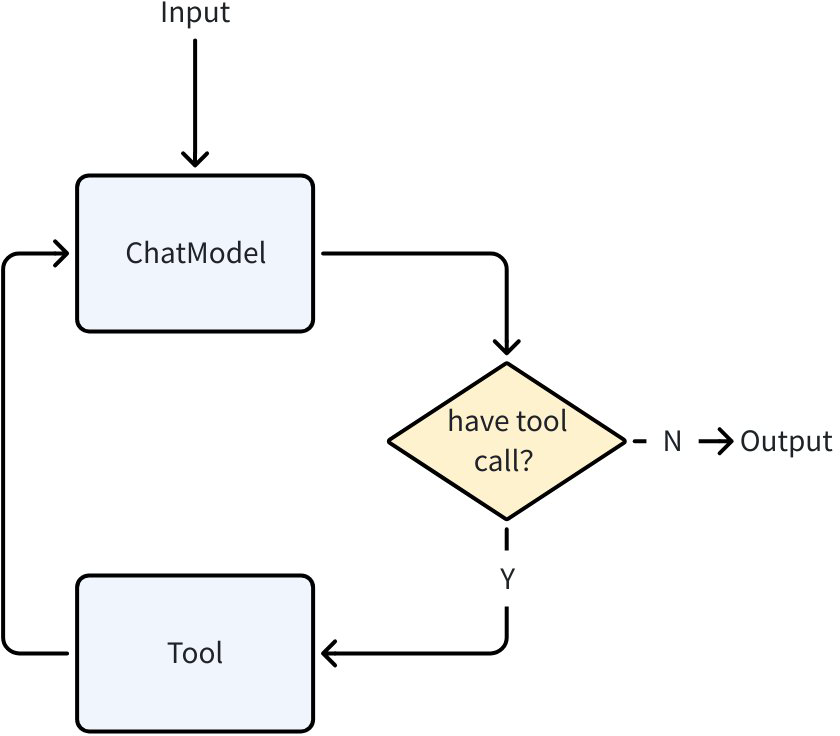
You can configure Tools for ChatModelAgent through ToolsConfig:
// github.com/cloudwego/eino/adk/chatmodel.go

type ToolsConfig struct {
    compose.ToolsNodeConfig

    // Names of the tools that will make agent return directly when the tool is called.
    // When multiple tools are called and more than one tool is in the return directly list, only the first one will be returned.
    ReturnDirectly map[string]bool

    // EmitInternalEvents indicates whether internal events from agentTool should be emitted
    // to the parent generator via a tool option injection at run-time.
    EmitInternalEvents bool
}
ToolsConfig reuses Eino Graph ToolsNodeConfig, see Eino: ToolsNode & Tool Usage Guide for details. Additionally, it provides the ReturnDirectly configuration. ChatModelAgent will exit directly after calling a Tool configured in ReturnDirectly.
ChatModelAgent Configuration Fields
💡 Note: GenModelInput by default renders the Instruction in F-String format using adk.GetSessionValues(). To disable this behavior, customize the GenModelInput method.
type ChatModelAgentConfig struct {
    // Name of the agent. Better be unique across all agents.
    Name string
    // Description of the agent's capabilities.
    // Helps other agents determine whether to transfer tasks to this agent.
    Description string
    // Instruction used as the system prompt for this agent.
    // Optional. If empty, no system prompt will be used.
    // Supports f-string placeholders for session values in default GenModelInput, for example:
    // "You are a helpful assistant. The current time is {Time}. The current user is {User}."
    // These placeholders will be replaced with session values for "Time" and "User".
    Instruction string

    Model model.ToolCallingChatModel

    ToolsConfig ToolsConfig

    // GenModelInput transforms instructions and input messages into the model's input format.
    // Optional. Defaults to defaultGenModelInput which combines instruction and messages.
    GenModelInput GenModelInput

    // Exit defines the tool used to terminate the agent process.
    // Optional. If nil, no Exit Action will be generated.
    // You can use the provided 'ExitTool' implementation directly.
    Exit tool.BaseTool

    // OutputKey stores the agent's response in the session.
    // Optional. When set, stores output via AddSessionValue(ctx, outputKey, msg.Content).
    OutputKey string

    // MaxIterations defines the upper limit of ChatModel generation cycles.
    // The agent will terminate with an error if this limit is exceeded.
    // Optional. Defaults to 20.
    MaxIterations int

    // ModelRetryConfig configures retry behavior for the ChatModel.
    // When set, the agent will automatically retry failed ChatModel calls
    // based on the configured policy.
    // Optional. If nil, no retry will be performed.
    ModelRetryConfig *ModelRetryConfig
}

type ToolsConfig struct {
    compose.ToolsNodeConfig

    // Names of the tools that will make agent return directly when the tool is called.
    // When multiple tools are called and more than one tool is in the return directly list, only the first one will be returned.
    ReturnDirectly map[string]bool

    // EmitInternalEvents indicates whether internal events from agentTool should be emitted
    // to the parent generator via a tool option injection at run-time.
    EmitInternalEvents bool
}

type GenModelInput func(ctx context.Context, instruction string, input *AgentInput) ([]Message, error)
Name: Agent nameDescription: Agent descriptionInstruction: System Prompt when calling ChatModel, supports f-string renderingModel: ChatModel used for running, must support tool callingToolsConfig: Tool configuration- ToolsConfig reuses Eino Graph ToolsNodeConfig, see Eino: ToolsNode & Tool Usage Guide for details.
- ReturnDirectly: When ChatModelAgent calls a Tool configured in ReturnDirectly, it will immediately exit with the result, without returning to ChatModel per the react pattern. If multiple Tools are hit, only the first Tool is returned. Map key is the Tool name.
- EmitInternalEvents: When using adk.AgentTool() to treat an Agent as a SubAgent through ToolCall, by default, this SubAgent will not send AgentEvents, only returning the final result as ToolResult.
GenModelInput: When the Agent is called, it uses this method to convertInstructionandAgentInputinto Messages for calling ChatModel. The Agent provides a default GenModelInput method:- Add
InstructionasSystem MessagebeforeAgentInput.Messages - Render
SessionValuesas variables into the message list from step 1
- Add
💡 The default
GenModelInputuses pyfmt rendering. Text in the message list is treated as a pyfmt template, meaning ‘{’ and ‘}’ in the text are treated as keywords. If you want to input these two characters directly, they need to be escaped as ‘{{’ and ‘}}’.
OutputKey: When configured, the last Message produced by ChatModelAgent running will be set inSessionValueswithOutputKeyas the keyMaxIterations: Maximum number of ChatModel generations in react mode. Agent will exit with error when exceeded. Default value is 20Exit: Exit is a special Tool. When the model calls this tool and executes it, ChatModelAgent will exit directly, with an effect similar toToolsConfig.ReturnDirectly. ADK provides a default ExitTool implementation for users:
type ExitTool struct{}

func (et ExitTool) Info(_ context.Context) (*schema.ToolInfo, error) {
    return ToolInfoExit, nil
}

func (et ExitTool) InvokableRun(ctx context.Context, argumentsInJSON string, _ ...tool.Option) (string, error) {
    type exitParams struct {
       FinalResult string `json:"final_result"`
    }

    params := &exitParams{}
    err := sonic.UnmarshalString(argumentsInJSON, params)
    if err != nil {
       return "", err
    }

    err = SendToolGenAction(ctx, "exit", NewExitAction())
    if err != nil {
       return "", err
    }

    return params.FinalResult, nil
}
ModelRetryConfig: When configured, various errors during ChatModel request (including direct errors and errors during streaming response) will be retried according to the configured policy. If an error occurs during streaming response, the streaming response will still be returned through AgentEvent immediately. If the error during streaming response will be retried according to the configured policy, consuming the message stream in AgentEvent will getWillRetryError. Users can handle this error for corresponding display processing. Example:
iterator := agent.Run(ctx, input)
for {
    event, ok := iterator.Next()
    if !ok {
        break
    }

    if event.Err != nil {
        handleFinalError(event.Err)
        break
    }

    // Process streaming output
    if event.Output != nil && event.Output.MessageOutput.IsStreaming {
        stream := event.Output.MessageOutput.MessageStream
        for {
            msg, err := stream.Recv()
            if err == io.EOF {
                break  // Stream completed successfully
            }
            if err != nil {
                // Check if this error will be retried (more streams coming)
                var willRetry *adk.WillRetryError
                if errors.As(err, &willRetry) {
                    log.Printf("Attempt %d failed, retrying...", willRetry.RetryAttempt)
                    break  // Wait for next event with new stream
                }
                // Original error - won't retry, agent will stop and the next AgentEvent probably will be an error
                log.Printf("Final error (no retry): %v", err)
                break
            }
            // Display chunk to user
            displayChunk(msg)
        }
    }
}
ChatModelAgent Transfer
ChatModelAgent supports converting other Agents’ meta information into its own Tools, achieving dynamic Transfer through ChatModel judgment:
ChatModelAgentimplements theOnSubAgentsinterface. After usingSetSubAgentsto set sub Agents forChatModelAgent,ChatModelAgentwill add aTransfer Tooland instruct ChatModel in the prompt to call this Tool when transfer is needed, using the transfer target AgentName as Tool input.
const (
    TransferToAgentInstruction = `Available other agents: %s

Decision rule:
- If you're best suited for the question according to your description: ANSWER
- If another agent is better according its description: CALL '%s' function with their agent name

When transferring: OUTPUT ONLY THE FUNCTION CALL`
)

func genTransferToAgentInstruction(ctx context.Context, agents []Agent) string {
    var sb strings.Builder
    for _, agent := range agents {
       sb.WriteString(fmt.Sprintf("\n- Agent name: %s\n  Agent description: %s",
          agent.Name(ctx), agent.Description(ctx)))
    }

    return fmt.Sprintf(TransferToAgentInstruction, sb.String(), TransferToAgentToolName)
}
Transfer Toolrunning sets a Transfer Event, specifying the jump to the target Agent, and ChatModelAgent exits after completion.- Agent Runner receives the Transfer Event and jumps to the target Agent for execution, completing the Transfer operation
ChatModelAgent AgentAsTool
When the Agent being called doesn’t need a complete running context but only clear and explicit input parameters to run correctly, the Agent can be converted to a Tool for ChatModelAgent to judge and call:
- ADK provides utility methods to conveniently convert Eino ADK Agents to Tools for ChatModelAgent to call:
// github.com/cloudwego/eino/adk/agent_tool.go

func NewAgentTool(_ context.Context, agent Agent, options ...AgentToolOption) tool.BaseTool
- Agents converted to Tools can be registered directly in ChatModelAgent through
ToolsConfig
bookRecommender := NewBookRecommendAgent()
bookRecommendeTool := NewAgentTool(ctx, bookRecommender)

a, err := adk.NewChatModelAgent(ctx, &adk.ChatModelAgentConfig{
    // ...
    ToolsConfig: adk.ToolsConfig{
        ToolsNodeConfig: compose.ToolsNodeConfig{
            Tools: []tool.BaseTool{bookRecommendeTool},
        },
    },
})
ChatModelAgent Middleware
ChatModelAgentMiddleware is an extension mechanism for ChatModelAgent that allows developers to inject custom logic at various stages of Agent execution:
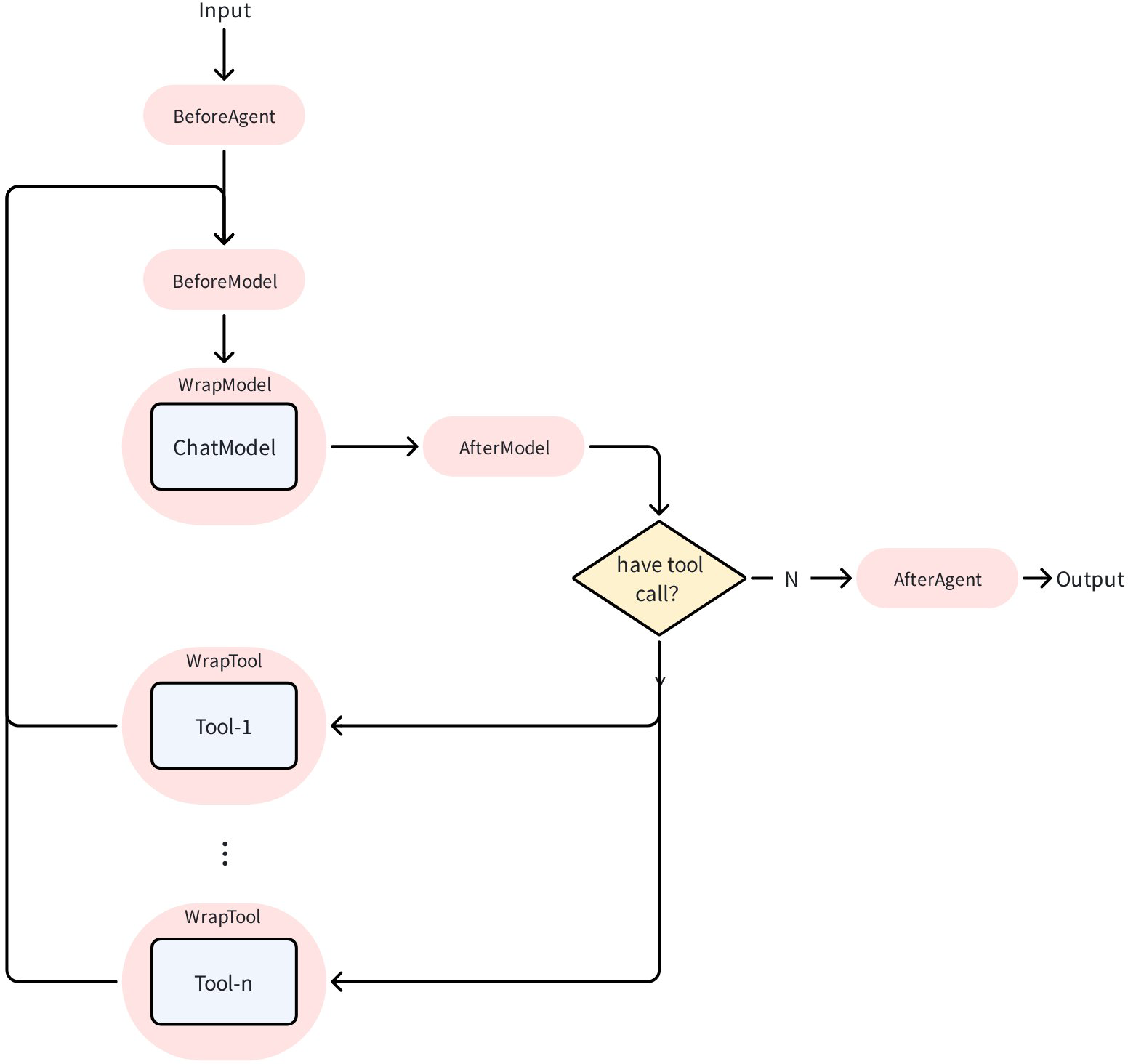
ChatModelAgentMiddleware is defined as an interface. Developers can implement this interface and configure it in ChatModelAgentConfig to make it effective in ChatModelAgent:
type ChatModelAgentMiddleware interface {
    // ...
}

a, err := adk.NewChatModelAgent(ctx, &adk.ChatModelAgentConfig{
    // ...
    Handlers: []adk.ChatModelAgentMiddleware{
        &MyMiddleware{},
    },
})
Using BaseChatModelAgentMiddleware
BaseChatModelAgentMiddleware provides default empty implementations for all methods. By embedding it, you can override only the methods you need:
type MyMiddleware struct {
    *adk.BaseChatModelAgentMiddleware
    // Custom fields
    logger *log.Logger
}

// Only override the methods you need
func (m *MyMiddleware) BeforeModelRewriteState(
    ctx context.Context,
    state *adk.ChatModelAgentState,
    mc *adk.ModelContext,
) (context.Context, *adk.ChatModelAgentState, error) {
    m.logger.Printf("Messages count: %d", len(state.Messages))
    return ctx, state, nil
}
BeforeAgent
Called before each Agent run, can be used to modify instructions and tool configuration. ChatModelAgentContext defines the content that can be read and written in BeforeAgent:
type ChatModelAgentContext struct {
    // Instruction is the current Agent's instruction
    Instruction string
    // Tools is the current configured original tool list
    Tools []tool.BaseTool
    // ReturnDirectly configures tool name sets that return directly after being called
    ReturnDirectly map[string]bool
}

type ChatModelAgentMiddleware interface {
    // ...
    BeforeAgent(ctx context.Context, runCtx *ChatModelAgentContext) (context.Context, *ChatModelAgentContext, error)
    // ...
}
Example:
func (m *MyMiddleware) BeforeAgent(
    ctx context.Context,
    runCtx *adk.ChatModelAgentContext,
) (context.Context, *adk.ChatModelAgentContext, error) {
    // Copy runCtx to avoid modifying input
    nRunCtx := *runCtx

    // Modify instruction
    nRunCtx.Instruction += "\n\nPlease always reply in Chinese."

    // Add tool
    nRunCtx.Tools = append(runCtx.Tools, myCustomTool)

    // Set tool to return directly
    nRunCtx.ReturnDirectly["my_tool"] = true

    return ctx, &nRunCtx, nil
}
BeforeModelRewriteState / AfterModelRewriteState
Called before/after each model call, can be used to inspect and modify message history. ModelContext defines read-only content, ChatModelAgentState defines read-write content:
type ModelContext struct {
    // Tools contains the list of tools currently configured for the Agent
    // Populated at request time, contains tool info that will be sent to the model
    Tools []*schema.ToolInfo

    // ModelRetryConfig contains the retry configuration for the model
    // Populated from Agent's ModelRetryConfig
    ModelRetryConfig *ModelRetryConfig
}

type ChatModelAgentState struct {
    // Messages contains all messages in the current session
    Messages []Message
}

type ChatModelAgentMiddleware interface {
    BeforeModelRewriteState(ctx context.Context, state *ChatModelAgentState, mc *ModelContext) (context.Context, *ChatModelAgentState, error)
    AfterModelRewriteState(ctx context.Context, state *ChatModelAgentState, mc *ModelContext) (context.Context, *ChatModelAgentState, error)
}
Example:
func (m *MyMiddleware) BeforeModelRewriteState(
    ctx context.Context,
    state *adk.ChatModelAgentState,
    mc *adk.ModelContext,
) (context.Context, *adk.ChatModelAgentState, error) {
    // Copy state to avoid modifying input
    nState := *state

    // Check message history
    if len(state.Messages) > 50 {
        // Truncate old messages
        nState.Messages = state.Messages[len(state.Messages)-50:]
    }
    return ctx, &nState, nil
}

func (m *MyMiddleware) AfterModelRewriteState(
    ctx context.Context,
    state *adk.ChatModelAgentState,
    mc *adk.ModelContext,
) (context.Context, *adk.ChatModelAgentState, error) {
    // Model response is the last message
    lastMsg := state.Messages[len(state.Messages)-1]
    m.logger.Printf("Model response: %s", lastMsg.Content)
    return ctx, state, nil
}
WrapModel
Wraps model calls, can be used to intercept and modify model input and output:
type ChatModelAgentMiddleware interface {
    WrapModel(ctx context.Context, m model.BaseChatModel, mc *ModelContext) (model.BaseChatModel, error)
}
Example:
func (m *MyMiddleware) WrapModel(
    ctx context.Context,
    chatModel model.BaseChatModel,
    mc *adk.ModelContext,
) (model.BaseChatModel, error) {
    return &loggingModel{
        inner: chatModel,
        logger: m.logger,
    }, nil
}

type loggingModel struct {
    inner  model.BaseChatModel
    logger *log.Logger
}

func (m *loggingModel) Generate(ctx context.Context, msgs []*schema.Message, opts ...model.Option) (*schema.Message, error) {
    m.logger.Printf("Input messages: %d", len(msgs))
    resp, err := m.inner.Generate(ctx, msgs, opts...)
    m.logger.Printf("Output: %v, error: %v", resp != nil, err)
    return resp, err
}

func (m *loggingModel) Stream(ctx context.Context, msgs []*schema.Message, opts ...model.Option) (*schema.StreamReader[*schema.Message], error) {
    return m.inner.Stream(ctx, msgs, opts...)
}
WrapInvokableToolCall / WrapStreamableToolCall
Wraps tool calls, can be used to intercept and modify tool input and output:
// InvokableToolCallEndpoint is the function signature for tool calls.
// Middleware developers add custom logic around this Endpoint.
type InvokableToolCallEndpoint func(ctx context.Context, argumentsInJSON string, opts ...tool.Option) (string, error)

// StreamableToolCallEndpoint is the function signature for streaming tool calls.
// Middleware developers add custom logic around this Endpoint.
type StreamableToolCallEndpoint func(ctx context.Context, argumentsInJSON string, opts ...tool.Option) (*schema.StreamReader[string], error)

type ToolContext struct {
    // Name indicates the name of the tool being called
    Name   string
    // CallID indicates the ToolCallID of this tool call
    CallID string
}

type ChatModelAgentMiddleware interface {
    WrapInvokableToolCall(ctx context.Context, endpoint InvokableToolCallEndpoint, tCtx *ToolContext) (InvokableToolCallEndpoint, error)
    WrapStreamableToolCall(ctx context.Context, endpoint StreamableToolCallEndpoint, tCtx *ToolContext) (StreamableToolCallEndpoint, error)
}
Example:
func (m *MyMiddleware) WrapInvokableToolCall(
    ctx context.Context,
    endpoint adk.InvokableToolCallEndpoint,
    tCtx *adk.ToolContext,
) (adk.InvokableToolCallEndpoint, error) {
    return func(ctx context.Context, argumentsInJSON string, opts ...tool.Option) (string, error) {
        m.logger.Printf("Calling tool: %s (ID: %s)", tCtx.Name, tCtx.CallID)
        start := time.Now()

        result, err := endpoint(ctx, argumentsInJSON, opts...)

        m.logger.Printf("Tool %s completed in %v", tCtx.Name, time.Since(start))
        return result, err
    }, nil
}
ChatModelAgent Usage Example
Scenario Description
Create a book recommendation Agent that can recommend relevant books based on user input.
Code Implementation
Step 1: Define Tools
The book recommendation Agent needs a book_search tool that can search for books based on user requirements (genre, rating, etc.).
Using utility methods provided by Eino makes it easy to create (see How to create a tool?):
import (
    "context"
    "log"

    "github.com/cloudwego/eino/components/tool"
    "github.com/cloudwego/eino/components/tool/utils"
)

type BookSearchInput struct {
    Genre     string `json:"genre" jsonschema:"description=Preferred book genre,enum=fiction,enum=sci-fi,enum=mystery,enum=biography,enum=business"`
    MaxPages  int    `json:"max_pages" jsonschema:"description=Maximum page length (0 for no limit)"`
    MinRating int    `json:"min_rating" jsonschema:"description=Minimum user rating (0-5 scale)"`
}

type BookSearchOutput struct {
    Books []string
}

func NewBookRecommender() tool.InvokableTool {
    bookSearchTool, err := utils.InferTool("search_book", "Search books based on user preferences", func(ctx context.Context, input *BookSearchInput) (output *BookSearchOutput, err error) {
       // search code
       // ...
       return &BookSearchOutput{Books: []string{"God's blessing on this wonderful world!"}}, nil
    })
    if err != nil {
       log.Fatalf("failed to create search book tool: %v", err)
    }
    return bookSearchTool
}
Step 2: Create ChatModel
Eino provides various ChatModel wrappers (such as openai, gemini, doubao, etc., see Eino: ChatModel Usage Guide for details). Here we use openai ChatModel as an example:
import (
    "context"
    "fmt"
    "log"
    "os"

    "github.com/cloudwego/eino-ext/components/model/openai"
    "github.com/cloudwego/eino/components/model"
)

func NewChatModel() model.ToolCallingChatModel {
    ctx := context.Background()
    apiKey := os.Getenv("OPENAI_API_KEY")
    openaiModel := os.Getenv("OPENAI_MODEL")

    cm, err := openai.NewChatModel(ctx, &openai.ChatModelConfig{
       APIKey: apiKey,
       Model:  openaiModel,
    })
    if err != nil {
       log.Fatal(fmt.Errorf("failed to create chatmodel: %w", err))
    }
    return cm
}
Step 3: Create ChatModelAgent
In addition to configuring ChatModel and tools, you need to configure Name and Description describing the Agent’s function and purpose, as well as the Instruction that instructs the ChatModel. The Instruction will ultimately be passed to ChatModel as a system message.
import (
    "context"
    "fmt"
    "log"

    "github.com/cloudwego/eino/adk"
    "github.com/cloudwego/eino/components/tool"
    "github.com/cloudwego/eino/compose"
)

func NewBookRecommendAgent() adk.Agent {
    ctx := context.Background()

    a, err := adk.NewChatModelAgent(ctx, &adk.ChatModelAgentConfig{
       Name:        "BookRecommender",
       Description: "An agent that can recommend books",
       Instruction: `You are an expert book recommender. Based on the user's request, use the "search_book" tool to find relevant books. Finally, present the results to the user.`,
       Model:       NewChatModel(),
       ToolsConfig: adk.ToolsConfig{
          ToolsNodeConfig: compose.ToolsNodeConfig{
             Tools: []tool.BaseTool{NewBookRecommender()},
          },
       },
    })
    if err != nil {
       log.Fatal(fmt.Errorf("failed to create chatmodel: %w", err))
    }

    return a
}
Step 4: Run via Runner
import (
    "context"
    "fmt"
    "log"
    "os"

    "github.com/cloudwego/eino/adk"

    "github.com/cloudwego/eino-examples/adk/intro/chatmodel/internal"
)

func main() {
    ctx := context.Background()
    a := internal.NewBookRecommendAgent()
    runner := adk.NewRunner(ctx, adk.RunnerConfig{
       Agent: a,
    })
    iter := runner.Query(ctx, "recommend a fiction book to me")
    for {
       event, ok := iter.Next()
       if !ok {
          break
       }
       if event.Err != nil {
          log.Fatal(event.Err)
       }
       msg, err := event.Output.MessageOutput.GetMessage()
       if err != nil {
          log.Fatal(err)
       }
       fmt.Printf("\nmessage:\n%v\n======", msg)
    }
}
Running Result
message:
assistant:
tool_calls:
{Index:<nil> ID:call_o2It087hoqj8L7atzr70EnfG Type:function Function:{Name:search_book Arguments:{"genre":"fiction","max_pages":0,"min_rating":0}} Extra:map[]}

finish_reason: tool_calls
usage: &{140 24 164}
======


message:
tool: {"Books":["God's blessing on this wonderful world!"]}
tool_call_id: call_o2It087hoqj8L7atzr70EnfG
tool_call_name: search_book
======


message:
assistant: I recommend the fiction book "God's blessing on this wonderful world!". It's a great choice for readers looking for an exciting story. Enjoy your reading!
finish_reason: stop
usage: &{185 31 216}
======
ChatModelAgent Interrupt and Resume
Introduction
ChatModelAgent is implemented using Eino Graph, so it can reuse Eino Graph’s Interrupt&Resume capability in the agent.
- On Interrupt, return a special error in the tool to make the Graph trigger an interrupt and throw custom information. On resume, the Graph will re-run this tool:
// github.com/cloudwego/eino/adk/interrupt.go

func NewInterruptAndRerunErr(extra any) error
- On Resume, custom ToolOptions are supported for passing additional information to the Tool during resume:
import (
    "github.com/cloudwego/eino/components/tool"
)

type askForClarificationOptions struct {
    NewInput *string
}

func WithNewInput(input string) tool.Option {
    return tool.WrapImplSpecificOptFn(func(t *askForClarificationOptions) {
       t.NewInput = &input
    })
}
Example
Below we will build on the code from the [ChatModelAgent Usage Example] section above to add a tool ask_for_clarification to BookRecommendAgent. When the user provides insufficient information for recommendations, the Agent will call this tool to ask the user for more information. ask_for_clarification uses the Interrupt&Resume capability to implement “asking” the user.
Step 1: Add Tool Supporting Interrupt
import (
    "context"
    "log"

    "github.com/cloudwego/eino/components/tool"
    "github.com/cloudwego/eino/components/tool/utils"
    "github.com/cloudwego/eino/compose"
)

type askForClarificationOptions struct {
    NewInput *string
}

func WithNewInput(input string) tool.Option {
    return tool.WrapImplSpecificOptFn(func(t *askForClarificationOptions) {
       t.NewInput = &input
    })
}

type AskForClarificationInput struct {
    Question string `json:"question" jsonschema:"description=The specific question you want to ask the user to get the missing information"`
}

func NewAskForClarificationTool() tool.InvokableTool {
    t, err := utils.InferOptionableTool(
       "ask_for_clarification",
       "Call this tool when the user's request is ambiguous or lacks the necessary information to proceed. Use it to ask a follow-up question to get the details you need, such as the book's genre, before you can use other tools effectively.",
       func(ctx context.Context, input *AskForClarificationInput, opts ...tool.Option) (output string, err error) {
          o := tool.GetImplSpecificOptions[askForClarificationOptions](nil, opts...)
          if o.NewInput == nil {
             return "", compose.NewInterruptAndRerunErr(input.Question)
          }
          return *o.NewInput, nil
       })
    if err != nil {
       log.Fatal(err)
    }
    return t
}
Step 2: Add Tool to Agent
func NewBookRecommendAgent() adk.Agent {
    // xxx
    a, err := adk.NewChatModelAgent(ctx, &adk.ChatModelAgentConfig{
       // xxx
       ToolsConfig: adk.ToolsConfig{
          ToolsNodeConfig: compose.ToolsNodeConfig{
             Tools: []tool.BaseTool{NewBookRecommender(), NewAskForClarificationTool()},
          },
          // Whether to output AgentEvents from SubAgent when Tool internally calls SubAgent via AgentTool()
          EmitInternalEvents: true,
       },
    })
    // xxx
}
Step 3: Configure CheckPointStore in Agent Runner
Configure CheckPointStore in Runner (the example uses the simplest InMemoryStore), and pass in CheckPointID when calling the Agent for use during resume. Also, on interrupt, Graph places InterruptInfo in Interrupted.Data:
func newInMemoryStore() compose.CheckPointStore {
    return &inMemoryStore{
       mem: map[string][]byte{},
    }
}

func main() {
    ctx := context.Background()
    a := subagents.NewBookRecommendAgent()
    runner := adk.NewRunner(ctx, adk.RunnerConfig{
       EnableStreaming: true, // you can disable streaming here
       Agent:           a,
       CheckPointStore: newInMemoryStore(),
    })
    iter := runner.Query(ctx, "recommend a book to me", adk.WithCheckPointID("1"))
    for {
       event, ok := iter.Next()
       if !ok {
          break
       }
       if event.Err != nil {
          log.Fatal(event.Err)
       }
       if event.Action != nil && event.Action.Interrupted != nil {
          fmt.Printf("\ninterrupt happened, info: %+v\n", event.Action.Interrupted.Data.(*adk.ChatModelAgentInterruptInfo).RerunNodesExtra["ToolNode"])
          continue
       }
       msg, err := event.Output.MessageOutput.GetMessage()
       if err != nil {
          log.Fatal(err)
       }
       fmt.Printf("\nmessage:\n%v\n======\n\n", msg)
    }

    scanner := bufio.NewScanner(os.Stdin)
    fmt.Print("\nyour input here: ")
    scanner.Scan()
    fmt.Println()
    nInput := scanner.Text()

    iter, err := runner.Resume(ctx, "1", adk.WithToolOptions([]tool.Option{subagents.WithNewInput(nInput)}))
    if err != nil {
       log.Fatal(err)
    }
    for {
       event, ok := iter.Next()
       if !ok {
          break
       }

       if event.Err != nil {
          log.Fatal(event.Err)
       }

       prints.Event(event)
    }
}
Running Result
An interrupt will occur after running
message:
assistant:
tool_calls:
{Index:<nil> ID:call_3HAobzkJvW3JsTmSHSBRftaG Type:function Function:{Name:ask_for_clarification Arguments:{"question":"Could you please specify the genre you're interested in and any preferences like maximum page length or minimum user rating?"}} Extra:map[]}

finish_reason: tool_calls
usage: &{219 37 256}
======


interrupt happened, info: &{ToolCalls:[{Index:<nil> ID:call_3HAobzkJvW3JsTmSHSBRftaG Type:function Function:{Name:ask_for_clarification Arguments:{"question":"Could you please specify the genre you're interested in and any preferences like maximum page length or minimum user rating?"}} Extra:map[]}] ExecutedTools:map[] RerunTools:[call_3HAobzkJvW3JsTmSHSBRftaG] RerunExtraMap:map[call_3HAobzkJvW3JsTmSHSBRftaG:Could you please specify the genre you're interested in and any preferences like maximum page length or minimum user rating?]}
your input here:
After stdin input, retrieve the previous interrupt state from CheckPointStore and continue running with the completed input
new input is:
recommend me a fiction book

message:
tool: recommend me a fiction book
tool_call_id: call_3HAobzkJvW3JsTmSHSBRftaG
tool_call_name: ask_for_clarification
======


message:
assistant:
tool_calls:
{Index:<nil> ID:call_3fC5OqPZLls11epXMv7sZGAF Type:function Function:{Name:search_book Arguments:{"genre":"fiction","max_pages":0,"min_rating":0}} Extra:map[]}

finish_reason: tool_calls
usage: &{272 24 296}
======


message:
tool: {"Books":["God's blessing on this wonderful world!"]}
tool_call_id: call_3fC5OqPZLls11epXMv7sZGAF
tool_call_name: search_book
======


message:
assistant: I recommend the fiction book "God's Blessing on This Wonderful World!" Enjoy your reading!
finish_reason: stop
usage: &{317 20 337}
======
Summary
ChatModelAgent is the core Agent implementation in ADK, serving as the “thinking” part of applications. It leverages the powerful capabilities of LLMs for reasoning, understanding natural language, making decisions, generating responses, and interacting with tools.
ChatModelAgent’s behavior is non-deterministic, dynamically deciding which tools to use or transferring control to other Agents through LLM.