Eino: Callback User Manual
Problem Solved
Components (including Lambda) and Graph orchestration together solve the problem of “defining business logic”. Cross-cutting concerns such as logging, tracing, metrics, and display on screen require mechanisms to inject functionality into Components (including Lambda) and Graphs.
On the other hand, users may want to obtain intermediate information during the execution of a specific Component implementation, such as VikingDBRetriever providing additional DB Name for queries, or ArkChatModel providing additional parameters like temperature for requests. A mechanism is needed to expose intermediate states.
Callbacks support “cross-cutting functionality injection” and “intermediate state exposure”. Specifically: users provide and register “functions” (Callback Handlers), and Components and Graphs call back these functions at fixed “timings” (or aspects, positions), providing corresponding information.
Core Concepts
The core concepts connect as follows: Entities in Eino such as Components and Graphs, at fixed timings (Callback Timing), call back functions (Callback Handlers) provided by users, passing out who they are (RunInfo) and what happened at that time (Callback Input & Output).
Triggering Entities
Components (including officially defined component types and Lambda), Graph Nodes (as well as Chain/Workflow Nodes), and Graphs themselves (as well as Chain/Workflow). These three types of entities all have needs for cross-cutting functionality injection and intermediate state exposure, so they all trigger callbacks. See the “Triggering Methods” section below for details.
Triggering Timing
// CallbackTiming enumerates all the timing of callback aspects.
type CallbackTiming = callbacks.CallbackTiming

const (
    TimingOnStart CallbackTiming = iota // Enter and start execution
    TimingOnEnd // Successfully completed and about to return
    TimingOnError // Failed and about to return err
    TimingOnStartWithStreamInput // OnStart, but input is StreamReader
    TimingOnEndWithStreamOutput // OnEnd, but output is StreamReader
)
Different triggering entities, in different scenarios, trigger OnStart or OnStartWithStreamInput (same logic for OnEnd/OnEndWithStreamOutput). The specific rules are detailed in the “Triggering Methods” section below.
Callback Handler
type Handler interface {
    OnStart(ctx context.Context, info *RunInfo, input CallbackInput) context.Context
    OnEnd(ctx context.Context, info *RunInfo, output CallbackOutput) context.Context
    OnError(ctx context.Context, info *RunInfo, err error) context.Context
    OnStartWithStreamInput(ctx context.Context, info *RunInfo,
       input *schema.StreamReader[CallbackInput]) context.Context
    OnEndWithStreamOutput(ctx context.Context, info *RunInfo,
       output *schema.StreamReader[CallbackOutput]) context.Context
}
A Handler is a struct that implements the above 5 methods (corresponding to 5 triggering timings). Each method receives three pieces of information:
- Context: Used to receive custom information that may be set by preceding triggering timings of the same Handler.
- RunInfo: Metadata of the entity triggering the callback.
- Input/Output/InputStream/OutputStream: Business information at the time of callback triggering.
And all return a new Context: for passing information between different triggering timings of the same Handler.
If a Handler doesn’t want to focus on all 5 triggering timings, but only some of them, such as only OnStart, it’s recommended to use NewHandlerBuilder().OnStartFn(...).Build(). If you don’t want to focus on all component types, but only specific components, such as ChatModel, it’s recommended to use NewHandlerHelper().ChatModel(...).Handler(), which allows you to receive only ChatModel callbacks and get a specifically typed CallbackInput/CallbackOutput. See the “Handler Implementation Methods” section for details.
There is no guaranteed triggering order between different Handlers.
RunInfo
Describes the metadata of the entity itself that triggers the Callback.
// RunInfo contains information about the running component that triggers callbacks.
type RunInfo struct {
    Name      string               // the 'Name' with semantic meaning for the running component, specified by end-user
    Type      string               // the specific implementation 'Type' of the component, e.g. 'OpenAI'
    Component components.Component // the component abstract type, e.g. 'ChatModel'
}
- Name: A name with business meaning, specified by the user. If not specified, it’s an empty string. For different triggering entities:
- Component: When in a Graph, use Node Name. When used standalone outside a Graph, manually set by the user. See “Injecting RunInfo” and “Using Components Standalone”
- Graph Node: Use Node Name
func WithNodeName(n string) GraphAddNodeOpt - Graph itself:
- Top-level graph uses Graph Name
func WithGraphName(graphName string) GraphCompileOption - Internal nested graphs use the Node Name added when joining the parent graph
- Top-level graph uses Graph Name
- Type: Specified by the specific component implementation:
- Components with interfaces: If Typer interface is implemented, use the result of GetType() method. Otherwise use reflection to get Struct/Func name.
- Lambda: If Type is specified using
func WithLambdaType(t string) LambdaOpt, use that, otherwise it’s an empty string. - Graph Node: Use the value of the internal Component/Lambda/Graph.
- Graph itself: Empty string.
- Component:
- Components with interfaces: Whatever interface it is
- Lambda: Fixed value Lambda
- Graph Node: Use the value of the internal Component/Lambda/Graph.
- Graph itself: Fixed value Graph / Chain / Workflow. (Previously there were StateGraph / StateChain, now integrated into Graph / Chain)
Callback Input & Output
Essentially any type, because different Components have completely different inputs, outputs, and internal states.
type CallbackInput any
type CallbackOutput any
For specific components, there are more specific types, such as Chat Model
// CallbackInput is the input for the model callback.
type CallbackInput struct {
    // Messages is the messages to be sent to the model.
    Messages []*schema.Message
    // Tools is the tools to be used in the model.
    Tools []*schema.ToolInfo
    // Config is the config for the model.
    Config *Config
    // Extra is the extra information for the callback.
    Extra map[string]any
}

// CallbackOutput is the output for the model callback.
type CallbackOutput struct {
    // Message is the message generated by the model.
    Message *schema.Message
    // Config is the config for the model.
    Config *Config
    // TokenUsage is the token usage of this request.
    TokenUsage *TokenUsage
    // Extra is the extra information for the callback.
    Extra map[string]any
}
In specific implementations of Chat Model, such as OpenAI Chat Model, it’s recommended for component authors to pass specific Input/Output types to the Callback Handler, rather than Any. This allows exposing more specific, customized intermediate state information.
If a Graph Node triggers the Callback, since the Node cannot get the component’s internal intermediate state information and can only get the input and output specified in the component interface, it can only give these to the Callback Handler. For Chat Model, it’s []*schema.Message and *schema.Message.
When the Graph itself triggers the Callback, the input and output are the overall input and output of the Graph.
Injecting Handlers
Handlers need to be injected into the Context to be triggered.
Injecting Global Handlers
Inject global Handlers through callbacks.AppendGlobalHandlers. After injection, all callback triggering behaviors will automatically trigger these global Handlers. Typical scenarios are global consistent, business-scenario-agnostic features like tracing and logging.
Not concurrency safe. It’s recommended to inject once during service initialization.
Injecting Handlers into Graph
Inject Handlers at graph runtime through compose.WithCallbacks. These Handlers will take effect on the entire run of the graph, including all Nodes within the Graph and the Graph itself (as well as all nested graphs).
Inject Handlers to a specific Node of the top-level Graph through compose.WithCallbacks(...).DesignateNode(...). When this Node itself is a nested Graph, it will be injected into the nested Graph itself and its internal Nodes.
Inject Handlers to a specific Node of an internally nested Graph through compose.WithCallbacks(...).DesignateNodeWithPath(...).
Injecting Handlers Outside Graph
If you don’t want to use Graph but want to use Callbacks, then:
Get a new Context through InitCallbacks(ctx context.Context, info *RunInfo, handlers ...Handler) and inject Handlers and RunInfo.
Handler Inheritance
Similar to how a child Context inherits all Values from the parent Context, a child Context also inherits all Handlers from the parent Context. For example, if the Context passed when running a Graph already has Handlers, these Handlers will be inherited and take effect throughout this run of the entire Graph.
Injecting RunInfo
RunInfo also needs to be injected into the Context to be given to the Handler when triggering callbacks.
Graph Managed RunInfo
Graph automatically injects RunInfo for all internal Nodes. The mechanism is that each Node’s execution is a new child Context, and Graph injects the corresponding Node’s RunInfo into this new Context.
Injecting RunInfo Outside Graph
If you don’t want to use Graph but want to use Callbacks, then:
Get a new Context through InitCallbacks(ctx context.Context, info *RunInfo, handlers ...Handler) and inject Handlers and RunInfo.
Get a new Context through ReuseHandlers(ctx context.Context, info *RunInfo) to reuse the Handlers in the previous Context and set new RunInfo.
Triggering Methods
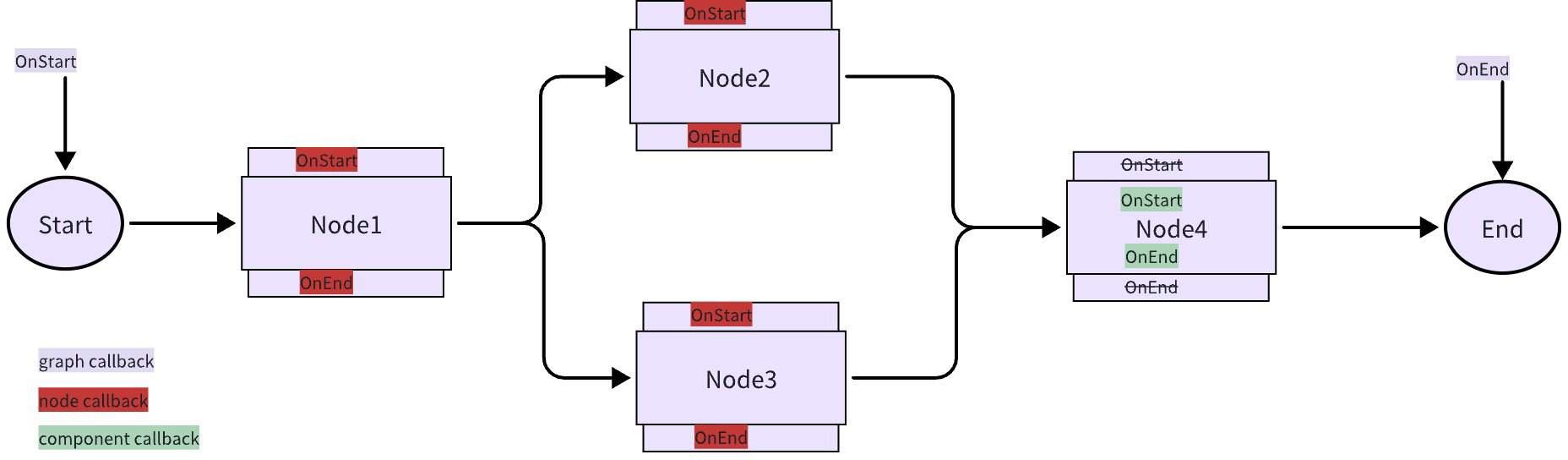
Triggering Inside Component Implementation (Component Callback)
In the component implementation code, call OnStart(), OnEnd(), OnError(), OnStartWithStreamInput(), OnEndWithStreamOutput() from the callbacks package. Taking Ark’s ChatModel implementation as an example, in the Generate method:
func (cm *ChatModel) Generate(ctx context.Context, in []*schema.Message, opts ...fmodel.Option) (
    outMsg *schema.Message, err error) {

    defer func() {
       if err != nil {
          _ = callbacks.OnError(ctx, err)
       }
    }()

    // omit multiple lines... instantiate req conf

    ctx = callbacks.OnStart(ctx, &fmodel.CallbackInput{
       Messages:   in,
       Tools:      append(cm.rawTools), // join tool info from call options
       ToolChoice: nil,                 // not support in api
       Config:     reqConf,
    })

    // omit multiple lines... invoke Ark chat API and get the response

    _ = callbacks.OnEnd(ctx, &fmodel.CallbackOutput{
       Message:    outMsg,
       Config:     reqConf,
       TokenUsage: toModelCallbackUsage(outMsg.ResponseMeta),
    })

    return outMsg, nil
}
In the Stream method:
func (cm *ChatModel) Stream(ctx context.Context, in []*schema.Message, opts ...fmodel.Option) ( // byted_s_too_many_lines_in_func
    outStream *schema.StreamReader[*schema.Message], err error) {

    defer func() {
       if err != nil {
          _ = callbacks.OnError(ctx, err)
       }
    }()

    // omit multiple lines... instantiate req conf

    ctx = callbacks.OnStart(ctx, &fmodel.CallbackInput{
       Messages:   in,
       Tools:      append(cm.rawTools), // join tool info from call options
       ToolChoice: nil,                 // not support in api
       Config:     reqConf,
    })

    // omit multiple lines... make request to Ark API and convert response stream to StreamReader[model.*CallbackOutput]

    _, sr = callbacks.OnEndWithStreamOutput(ctx, sr)

    return schema.StreamReaderWithConvert(sr,
       func(src *fmodel.CallbackOutput) (*schema.Message, error) {
          if src.Message == nil {
             return nil, schema.ErrNoValue
          }

          return src.Message, nil
       },
    ), nil
}
As you can see, Generate calls trigger OnEnd, while Stream calls trigger OnEndWithStreamOutput:
When triggering Callbacks inside component implementation:
- When the component input is StreamReader, trigger OnStartWithStreamInput, otherwise trigger OnStart
- When the component output is StreamReader, trigger OnEndWithStreamOutput, otherwise trigger OnEnd
Components that implement callback triggering internally should implement the Checker interface, with IsCallbacksEnabled returning true, to communicate “I have implemented callback triggering internally”:
// Checker tells callback aspect status of component's implementation
// When the Checker interface is implemented and returns true, the framework will not start the default aspect.
// Instead, the component will decide the callback execution location and the information to be injected.
type Checker interface {
    IsCallbacksEnabled() bool
}
If a component implementation doesn’t implement the Checker interface, or IsCallbacksEnabled returns false, it can be assumed that the component doesn’t trigger callbacks internally, and the Graph Node needs to be responsible for injection and triggering (when used within a Graph).
Graph Node Triggering (Node Callback)
When a Component is orchestrated into a Graph, it becomes a Node. At this point, if the Component itself triggers callbacks, the Node reuses the Component’s callback handling. Otherwise, the Node wraps callback handler trigger points around the Component. These points correspond to the Component’s own streaming paradigms. For example, a ChatModelNode will have OnStart/OnEnd/OnError wrapped around the Generate method, and OnStart/OnEndWithStreamOutput/OnError wrapped around the Stream method.
When the Graph runs, each component runs in either Invoke or Transform paradigm, and calls the corresponding component method based on the component’s specific business streaming paradigm. For example, when Graph runs with Invoke, the Chat Model Node runs with Invoke, calling the Generate method. When Graph runs with Stream, the Chat Model Node runs with Transform, but since Chat Model’s business streaming paradigm doesn’t have Transform, it automatically falls back to calling the Stream method. Therefore:
Which specific point the Graph Node triggers (OnStart or OnStartWithStreamInput) depends on both the component implementation’s business streaming paradigm and the Graph’s running method.
For a detailed introduction to Eino streaming programming, see Eino Stream Programming Essentials
Graph Self-Triggering (Graph Callback)
Graph triggers Callback Handlers at its own start, end, and error timings. If Graph is called with Invoke, it triggers OnStart/OnEnd/OnError. If called with Stream/Collect/Transform, it triggers OnStartWithStreamInput/OnEndWithStreamOutput/OnError. This is because Graph internally always executes with Invoke or Transform. See Eino Stream Programming Essentials
It’s worth noting that: graph is also a type of component, so graph callback is also a special form of component callback. According to the Node Callback definition, when the component inside a Node has implemented awareness and handling of triggering timing, the Node will directly reuse the Component’s implementation and won’t implement Node Callback again. This means when a graph is added to another Graph as a Node through AddGraphNode, this Node will reuse the internal graph’s graph callback.
Parsing Callback Input & Output
As mentioned above, the underlying type of Callback Input & Output is Any, but different component types may pass their own specific types when actually triggering callbacks. And in the Callback Handler interface definition, the parameters of each method are also Any type Callback Input & Output.
Therefore, specific Handler implementations need to do two things:
- Determine which component type currently triggered the callback based on RunInfo, such as RunInfo.Component == “ChatModel”, or RunInfo.Type == “xxx Chat Model”.
- Convert the any type Callback Input & Output to the corresponding specific type. Taking RunInfo.Component == “ChatModel” as an example:
// ConvCallbackInput converts the callback input to the model callback input.
func ConvCallbackInput(src callbacks.CallbackInput) *CallbackInput {
    switch t := src.(type) {
    case *CallbackInput: // when callback is triggered within component implementation, the input is usually already a typed *model.CallbackInput
       return t
    case []*schema.Message: // when callback is injected by graph node, not the component implementation itself, the input is the input of Chat Model interface, which is []*schema.Message
       return &CallbackInput{
          Messages: t,
       }
    default:
       return nil
    }
}

// ConvCallbackOutput converts the callback output to the model callback output.
func ConvCallbackOutput(src callbacks.CallbackOutput) *CallbackOutput {
    switch t := src.(type) {
    case *CallbackOutput: // when callback is triggered within component implementation, the output is usually already a typed *model.CallbackOutput
       return t
    case *schema.Message: // when callback is injected by graph node, not the component implementation itself, the output is the output of Chat Model interface, which is *schema.Message
       return &CallbackOutput{
          Message: t,
       }
    default:
       return nil
    }
}
If the Handler needs to add switch cases to determine RunInfo.Component, and for each case, call the corresponding conversion function to convert Any to a specific type, it’s indeed complex. To reduce the repetitive work of writing glue code, we provide two convenient utility functions for implementing Handlers.
Handler Implementation Methods
Besides directly implementing the Handler interface, Eino provides two convenient Handler implementation tools.
HandlerHelper
If the user’s Handler only focuses on specific component types, such as the ReactAgent scenario, only focusing on ChatModel and Tool, it’s recommended to use HandlerHelper to quickly create specifically typed Callback Handlers:
import ucb "github.com/cloudwego/eino/utils/callbacks"

handler := ucb.NewHandlerHelper().ChatModel(modelHandler).Tool(toolHandler).Handler()
Where modelHandler is a further encapsulation of the callback handler for the Chat Model component:
// from package utils/callbacks

// ModelCallbackHandler is the handler for the model callback.
type ModelCallbackHandler struct {
    OnStart               func(ctx context.Context, runInfo *callbacks.RunInfo, input *model.CallbackInput) context.Context
    OnEnd                 func(ctx context.Context, runInfo *callbacks.RunInfo, output *model.CallbackOutput) context.Context
    OnEndWithStreamOutput func(ctx context.Context, runInfo *callbacks.RunInfo, output *schema.StreamReader[*model.CallbackOutput]) context.Context
    OnError               func(ctx context.Context, runInfo *callbacks.RunInfo, err error) context.Context
}
The ModelCallbackHandler above encapsulates three operations:
- No longer need to check RunInfo.Component to select callbacks triggered by ChatModel, as automatic filtering is already done.
- Only requires implementing triggering timings supported by the Chat Model component. Here the unsupported OnStartWithStreamInput is removed. Also, if the user only cares about some of the four timings supported by Chat Model, such as only OnStart, they can implement only OnStart.
- Input/Output are no longer Any type, but already converted model.CallbackInput, model.CallbackOutput.
HandlerHelper supports all official components. The current list is: ChatModel, ChatTemplate, Retriever, Indexer, Embedding, Document.Loader, Document.Transformer, Tool, ToolsNode.
For “components” like Lambda, Graph, Chain whose input and output types are uncertain, HandlerHelper can also be used, but only achieves point 1 above, i.e., automatic filtering by component type. Points 2 and 3 still need to be implemented by the user:
import ucb "github.com/cloudwego/eino/utils/callbacks"

handler := ucb.NewHandlerHelper().Lambda(callbacks.Handler).Graph(callbacks.Handler)...Handler()
In this case, the callbacks.Handler passed to NewHandlerHelper().Lambda() can be implemented using HandlerBuilder below.
HandlerBuilder
If the user’s Handler needs to focus on multiple component types but only needs to focus on some triggering timings, HandlerBuilder can be used:
import "github.com/cloudwego/eino/callbacks"

handler := callbacks.NewHandlerBuilder().OnStartFn(fn)...Build()
Best Practices
Using in Graph
- Actively use Global Handlers to register always-effective Handlers.
package main

import (
        "context"
        "log"

        "github.com/cloudwego/eino/callbacks"
        "github.com/cloudwego/eino/compose"
)

func main() {
        // Build a simple global handler
        handler := callbacks.NewHandlerBuilder().
                OnStartFn(func(ctx context.Context, info *callbacks.RunInfo, input callbacks.CallbackInput) context.Context {
                        log.Printf("[Global Start] component=%s name=%s input=%T", info.Component, info.Name, input)
                        return ctx
                }).
                OnEndFn(func(ctx context.Context, info *callbacks.RunInfo, output callbacks.CallbackOutput) context.Context {
                        log.Printf("[Global End] component=%s name=%s output=%T", info.Component, info.Name, output)
                        return ctx
                }).
                OnErrorFn(func(ctx context.Context, info *callbacks.RunInfo, err error) context.Context {
                        log.Printf("[Global Error] component=%s name=%s err=%v", info.Component, info.Name, err)
                        return ctx
                }).
                Build()

        // Register as global callbacks (applies to all subsequent runs)
        callbacks.AppendGlobalHandlers(handler)

        // Example graph usage; the global handler will be invoked automatically
        g := compose.NewGraph[string, string]()
        // ... add nodes/edges ...
        r, _ := g.Compile(context.Background())
        _, _ = r.Invoke(context.Background(), "hello") // triggers global callbacks
}
- Inject Handlers at runtime through WithHandlers option, specify effective Nodes / nested internal Graphs / internal Graph’s Nodes through DesignateNode or DesignateNodeByPath.
package main

import (
        "context"

        "github.com/cloudwego/eino/callbacks"
        "github.com/cloudwego/eino/compose"
        "github.com/cloudwego/eino/components/prompt"
        "github.com/cloudwego/eino/schema"
)

func main() {
        ctx := context.Background()

        top := compose.NewGraph[map[string]any, []*schema.Message]()
        sub := compose.NewGraph[map[string]any, []*schema.Message]()
        _ = sub.AddChatTemplateNode("tmpl_nested", prompt.FromMessages(schema.FString, schema.UserMessage("Hello, {name}!")))
        _ = sub.AddEdge(compose.START, "tmpl_nested")
        _ = sub.AddEdge("tmpl_nested", compose.END)
        _ = top.AddGraphNode("sub_graph", sub)
        _ = top.AddEdge(compose.START, "sub_graph")
        _ = top.AddEdge("sub_graph", compose.END)
        r, _ := top.Compile(ctx)

        optGlobal := compose.WithCallbacks(
                callbacks.NewHandlerBuilder().OnEndFn(func(ctx context.Context, _ *callbacks.RunInfo, _ callbacks.CallbackOutput) context.Context { return ctx }).Build(),
        )
        optNode := compose.WithCallbacks(
                callbacks.NewHandlerBuilder().OnStartFn(func(ctx context.Context, _ *callbacks.RunInfo, _ callbacks.CallbackInput) context.Context { return ctx }).Build(),
        ).DesignateNode("sub_graph")
        optNested := compose.WithChatTemplateOption(
                prompt.WrapImplSpecificOptFn(func(_ *struct{}) {}),
        ).DesignateNodeWithPath(
                compose.NewNodePath("sub_graph", "tmpl_nested"),
        )

        _, _ = r.Invoke(ctx, map[string]any{"name": "Alice"}, optGlobal, optNode, optNested)
}
Using Outside Graph
This scenario is: not using orchestration capabilities like Graph/Chain/Workflow, but calling ChatModel/Tool/Lambda and other components directly with code, and hoping these components can successfully trigger Callback Handlers.
The problem users need to solve in this scenario is: manually setting the correct RunInfo and Handlers, because there’s no Graph to automatically set RunInfo and Handlers for the user.
Complete example:
package main

import (
        "context"

        "github.com/cloudwego/eino/callbacks"
        "github.com/cloudwego/eino/compose"
)

func innerLambda(ctx context.Context, input string) (string, error) {
        // As the implementer of ComponentB: add default RunInfo when entering the component (Name cannot be given a default value)
        ctx = callbacks.EnsureRunInfo(ctx, "Lambda", compose.ComponentOfLambda)
        ctx = callbacks.OnStart(ctx, input)
        out := "inner:" + input
        ctx = callbacks.OnEnd(ctx, out)
        return out, nil
}

func outerLambda(ctx context.Context, input string) (string, error) {
        // As the implementer of ComponentA: add default RunInfo when entering the component
        ctx = callbacks.EnsureRunInfo(ctx, "Lambda", compose.ComponentOfLambda)
        ctx = callbacks.OnStart(ctx, input)

        // Recommended: replace RunInfo before calling, ensure inner component gets correct name/type/component
        ctxInner := callbacks.ReuseHandlers(ctx,
                &callbacks.RunInfo{Name: "ComponentB", Type: "Lambda", Component: compose.ComponentOfLambda},
        )
        out1, _ := innerLambda(ctxInner, input) // Inner RunInfo.Name = "ComponentB"

        // Not replaced: framework clears RunInfo, can only rely on EnsureRunInfo to add default values (Name is empty)
        out2, _ := innerLambda(ctx, input) // Inner RunInfo.Name == ""

        final := out1 + "|" + out2
        ctx = callbacks.OnEnd(ctx, final)
        return final, nil
}

func main() {
        // Using components standalone outside graph: initialize RunInfo and Handlers
        h := callbacks.NewHandlerBuilder().Build()
        ctx := callbacks.InitCallbacks(context.Background(),
                &callbacks.RunInfo{Name: "ComponentA", Type: "Lambda", Component: compose.ComponentOfLambda},
                h,
        )

        _, _ = outerLambda(ctx, "ping")
}
Explanation of the sample code above:
- Initialization: When using components outside graph/chain, use InitCallbacks to set the first RunInfo and Handlers, so subsequent component execution can get complete callback context.
- Internal calls: Before calling component B inside component A, use ReuseHandlers to replace RunInfo (retaining original handlers), ensuring B’s callback gets correct Type/Component/Name.
- Consequences of not replacing: After a complete set of Callbacks is triggered, Eino clears the RunInfo in the current ctx. At this point, because RunInfo is empty, Eino will no longer trigger Callbacks; component B’s developer can only use EnsureRunInfo in their own implementation to add default values for Type/Component to ensure RunInfo is non-empty and roughly correct, thus successfully triggering Callbacks. But cannot give a reasonable Name, so RunInfo.Name will be an empty string.
Nested Component Usage
Scenario: Manually calling another component, such as ChatModel, inside a component, such as Lambda.
At this point, if the outer component’s ctx has callback handlers, because this ctx is also passed to the inner component, the inner component will also receive the same callback handlers.
Distinguishing by “whether you want the inner component to trigger callbacks”:
- Want to trigger: Basically the same as the previous section, it’s recommended to manually set
RunInfofor the inner component throughReuseHandlers.
package main

import (
        "context"

        "github.com/cloudwego/eino/callbacks"
        "github.com/cloudwego/eino/components"
        "github.com/cloudwego/eino/components/model"
        "github.com/cloudwego/eino/compose"
        "github.com/cloudwego/eino/schema"
)

// Outer Lambda, manually calls ChatModel inside
func OuterLambdaCallsChatModel(cm model.BaseChatModel) *compose.Lambda {
        return compose.InvokableLambda(func(ctx context.Context, input string) (string, error) {
                // 1) Reuse outer handlers, and explicitly set RunInfo for inner component
                innerCtx := callbacks.ReuseHandlers(ctx, &callbacks.RunInfo{
                        Type:      "InnerCM",                          // customizable
                        Component: components.ComponentOfChatModel,    // mark component type
                        Name:      "inner-chat-model",                 // customizable
                })

                // 2) Construct input messages
                msgs := []*schema.Message{{Role: schema.User, Content: input}}

                // 3) Call ChatModel (will trigger corresponding callbacks internally)
                out, err := cm.Generate(innerCtx, msgs)
                if err != nil {
                        return "", err
                }
                return out.Content, nil
        })
}
The code above assumes “the inner ChatModel’s Generate method has already called OnStart, OnEnd, OnError internally”. If not, you need to call these methods “on behalf of the inner component” inside the outer component:
func OuterLambdaCallsChatModel(cm model.BaseChatModel) *compose.Lambda {
        return compose.InvokableLambda(func(ctx context.Context, input string) (string, error) {
                // Reuse outer handlers, and explicitly set RunInfo for inner component
                ctx = callbacks.ReuseHandlers(ctx, &callbacks.RunInfo{
                        Type:      "InnerCM",
                        Component: components.ComponentOfChatModel,
                        Name:      "inner-chat-model",
                })

                // Construct input messages
                msgs := []*schema.Message{{Role: schema.User, Content: input}}

                // Explicitly trigger OnStart
                ctx = callbacks.OnStart(ctx, msgs)

                // Call ChatModel
                resp, err := cm.Generate(ctx, msgs)
                if err != nil {
                        // Explicitly trigger OnError
                        ctx = callbacks.OnError(ctx, err)
                        return "", err
                }

                // Explicitly trigger OnEnd
                ctx = callbacks.OnEnd(ctx, resp)

                return resp.Content, nil
        })
}
-
Don’t want to trigger: This assumes the inner component implements
IsCallbacksEnabled()and returns true, and callsEnsureRunInfointernally. At this point, inner callbacks will trigger by default. If you don’t want to trigger, the simplest way is to remove the handler from ctx, such as passing a new ctx to the inner component:package main import ( "context" "github.com/cloudwego/eino/components/model" "github.com/cloudwego/eino/compose" "github.com/cloudwego/eino/schema" ) func OuterLambdaNoCallbacks(cm model.BaseChatModel) *compose.Lambda { return compose.InvokableLambda(func(ctx context.Context, input string) (string, error) { // Use a brand new ctx, don't reuse outer handlers innerCtx := context.Background() msgs := []*schema.Message{{Role: schema.User, Content: input}} out, err := cm.Generate(innerCtx, msgs) if err != nil { return "", err } return out.Content, nil }) }- But sometimes users may want to “not trigger a specific callback handler, but still trigger other callback handlers”. The recommended approach is to add code in this callback handler to filter out the inner component based on RunInfo:
package main

import (
        "context"
        "log"

        "github.com/cloudwego/eino/callbacks"
        "github.com/cloudwego/eino/components"
        "github.com/cloudwego/eino/compose"
)

// A handler that filters by RunInfo: does nothing for inner ChatModel (Type=InnerCM, Name=inner-chat-model)
func newSelectiveHandler() callbacks.Handler {
        return callbacks.
                NewHandlerBuilder().
                OnStartFn(func(ctx context.Context, info *callbacks.RunInfo, input callbacks.CallbackInput) context.Context {
                        if info != nil && info.Component == components.ComponentOfChatModel &&
                                info.Type == "InnerCM" && info.Name == "inner-chat-model" {
                                // Filter target: inner ChatModel, return directly, do nothing
                                return ctx
                        }
                        log.Printf("[OnStart] %s/%s (%s)", info.Type, info.Name, info.Component)
                        return ctx
                }).
                OnEndFn(func(ctx context.Context, info *callbacks.RunInfo, output callbacks.CallbackOutput) context.Context {
                        if info != nil && info.Component == components.ComponentOfChatModel &&
                                info.Type == "InnerCM" && info.Name == "inner-chat-model" {
                                // Filter target: inner ChatModel, return directly, do nothing
                                return ctx
                        }
                        log.Printf("[OnEnd] %s/%s (%s)", info.Type, info.Name, info.Component)
                        return ctx
                }).
                Build()
}

// Combination example: outer call wants to trigger, specific handler filters out inner ChatModel through RunInfo
func Example(cm model.BaseChatModel) (compose.Runnable[string, string], error) {
        handler := newSelectiveHandler()

        chain := compose.NewChain[string, string]().
                AppendLambda(OuterLambdaCallsChatModel(cm)) // Will ReuseHandlers + RunInfo internally

        return chain.Compile(
                context.Background(),
                // Mount handler (can also combine with global handlers)
                compose.WithCallbacks(handler),
        )
}
Reading and Writing Input & Output in Handler
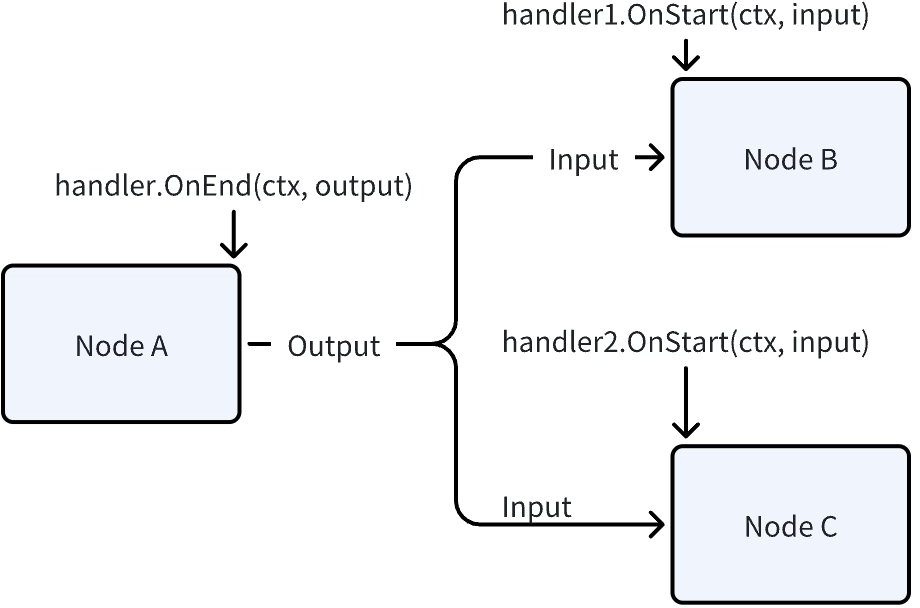
Input & output flow in the graph through direct variable assignment. As shown in the figure below, NodeA.Output, NodeB.Input, NodeC.Input, and the input & output obtained in each Handler, if they are reference types like struct pointers or Maps, are all the same piece of data. Therefore, modifying Input & Output is not recommended in either Node or Handler, as it will cause concurrency issues: even in synchronous situations, Node B and Node C may be concurrent, causing handler1 and handler2 to be concurrent. With asynchronous processing logic, there are more possible concurrency scenarios.
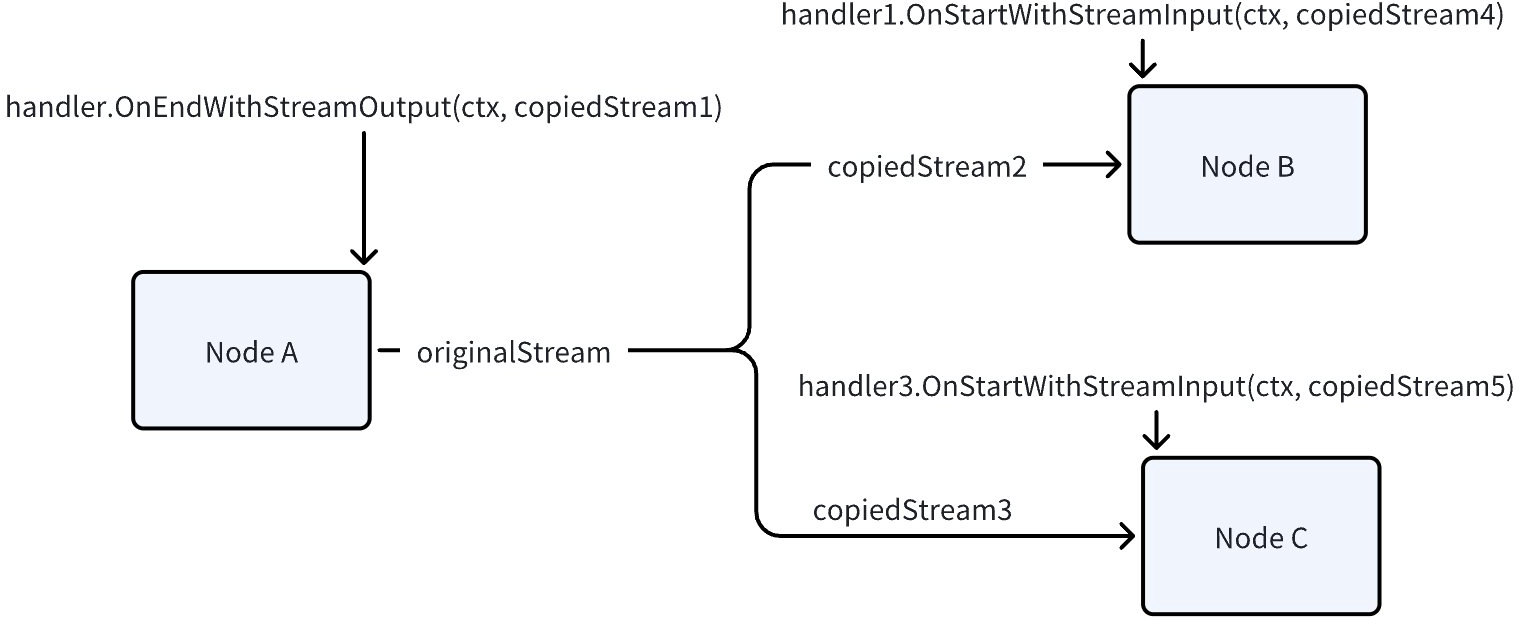
In stream passing scenarios, input streams in all downstream nodes and handlers are streams obtained from StreamReader.Copy(n), which can be read independently. However, each chunk in the stream is direct variable assignment. If the chunk is a reference type like struct pointer or Map, the same piece of data is read by each copied stream. Therefore, modifying stream chunks in Node and Handler is also not recommended due to concurrency issues.
Passing Information Between Handlers
Information can be passed between different timings of the same Handler through ctx, such as returning a new context through context.WithValue in OnStart, and retrieving this value from the context in OnEnd.
Between different Handlers, there’s no guaranteed execution order, so passing information between different Handlers through the above mechanism is not recommended. Essentially, there’s no guarantee that the context returned by one Handler will definitely enter the function execution of the next Handler.
If information needs to be passed between different Handlers, the recommended approach is to set a global, request-level variable in the outermost context (such as the context passed when executing the graph) as a common information storage space, and read and update this common variable as needed in each Handler. Users need to ensure the concurrency safety of this common variable themselves.
Streams Must Be Closed
Taking the presence of nodes like ChatModel that have true stream output as an example, when there are Callback aspects, the ChatModel’s output stream:
- Needs to be consumed both by downstream nodes as input and by Callback aspects
- A frame (Chunk) in a stream can only be consumed by one consumer, i.e., streams are not broadcast model
So the stream needs to be copied at this point, with the copy relationship as follows:
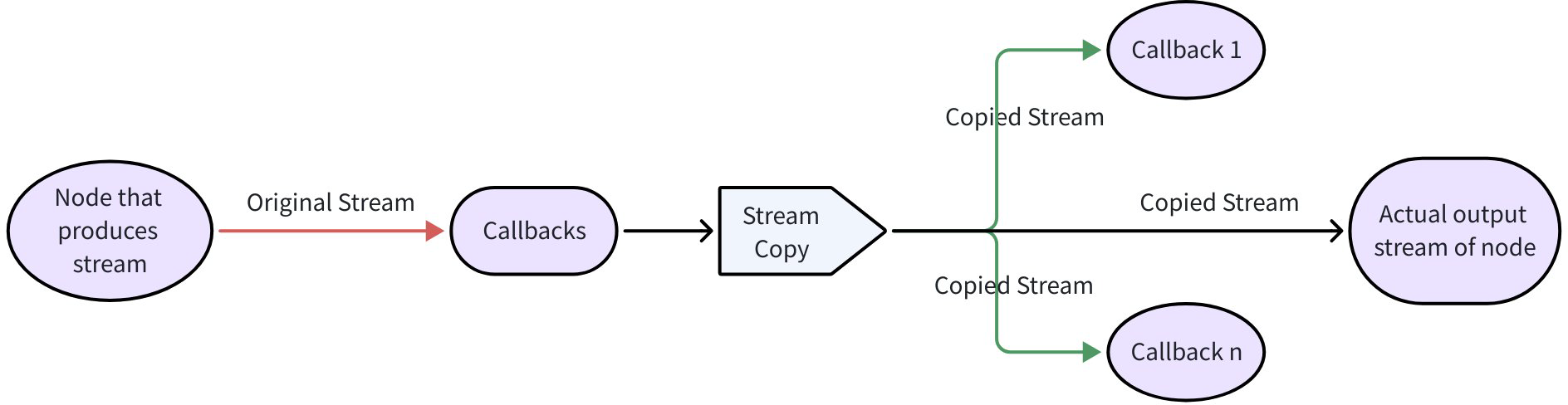
- If one of the Callback n doesn’t Close the corresponding stream, it may cause the original Stream to be unable to Close and release resources.